A WordPress firewall can block a malicious request very early, sometimes before WordPress itself loads. But if that firewall runs on your server, the request has still reached the origin. Your server has to accept it and do enough work to decide what happens next. For occasional probes, that cost is negligible. When scanners, login bots, or scrapers send thousands of requests, it starts to matter. Cloudflare gives you another option: stop selected traffic at the edge before it reaches the server at all.
Why bot traffic matters to WordPress performance
Every public WordPress site receives automated traffic. Some of it is legitimate, such as search engines, uptime monitors, social previews, and AI assistants. Some of it is not: vulnerability scanners, login bots, content scrapers, fake crawlers, and requests looking for exposed files such as .env, backup archives, debug logs, and old copies of wp-config.php.
A single request usually does not matter. The problem is repetition.
Requests to dynamic endpoints such as wp-login.php, XML-RPC, REST routes, missing URLs, and sensitive paths can consume PHP workers, CPU, memory, connections, and database time. A firewall may reject every one of them, but the cost of reaching that decision still exists when the traffic is handled at the origin.
That is especially noticeable on shared hosting and smaller VPS plans, where a burst of automated traffic can compete directly with real visitors for the same limited resources.
AI crawlers add another source of automated traffic. They are not necessarily malicious, but an aggressive crawler can still request large numbers of pages. SiteFort handles that separately through its AI crawler controls, which let you choose how known training, assistant, and search crawlers are treated.
Three places a WordPress firewall can block traffic
A typical request to a WordPress site behind Cloudflare follows this path:
Visitor or bot → Cloudflare → web server → PHP → WordPress
| Firewall layer | Where blocking happens | What reaches your server |
|---|---|---|
| Early PHP / application firewall | On the origin server | The request reaches the server and may start PHP, but can be stopped before WordPress fully loads |
| Server-level firewall | At the origin before WordPress loads | The connection still reaches the server, but WordPress does not need to process it |
| Cloudflare edge firewall | On Cloudflare’s network | Traffic blocked at the edge is not forwarded to the origin |
This is an important distinction. A well-designed WordPress firewall does not need to wait for the entire application to load before it blocks something. Early-firewall execution can make local blocking very efficient.
SiteFort’s Server-Level WAF goes further by rejecting supported malicious requests before WordPress loads.
Cloudflare moves enforcement off the server completely. When a request is blocked at the edge, it does not consume a PHP worker, start WordPress, or trigger database work on the origin.
Why Cloudflare and WordPress see different things
Cloudflare can evaluate a request before it reaches your site. It can see signals such as the visitor IP, country, ASN, URL, headers, request rate, bot characteristics, and known attack patterns.
WordPress sees something different: what actually happened inside the application.
For example, SiteFort can know that:
- a login attempt failed;
- an IP repeatedly requested sensitive or suspicious paths;
- a visitor triggered a local lockout or rate limit;
- a request matched WordPress-specific firewall behavior;
- a user is authenticated and should be treated differently from an anonymous visitor.
Cloudflare can create powerful rules around external request signals, but it does not automatically know every security decision made inside WordPress.
That is why using both layers makes sense. WordPress can make decisions using application context, while Cloudflare can enforce selected decisions before the next request reaches the server.
How SiteFort Cloudflare Sync works
Cloudflare Sync connects SiteFort’s firewall to the Cloudflare zone already serving your website.
SiteFort continues to evaluate WordPress-specific activity locally. Supported firewall rules can also be pushed to Cloudflare, where matching requests are stopped before they reach the origin.
This includes supported IP and country rules as well as temporary edge blocks created when the same IP repeatedly triggers SiteFort’s firewall.
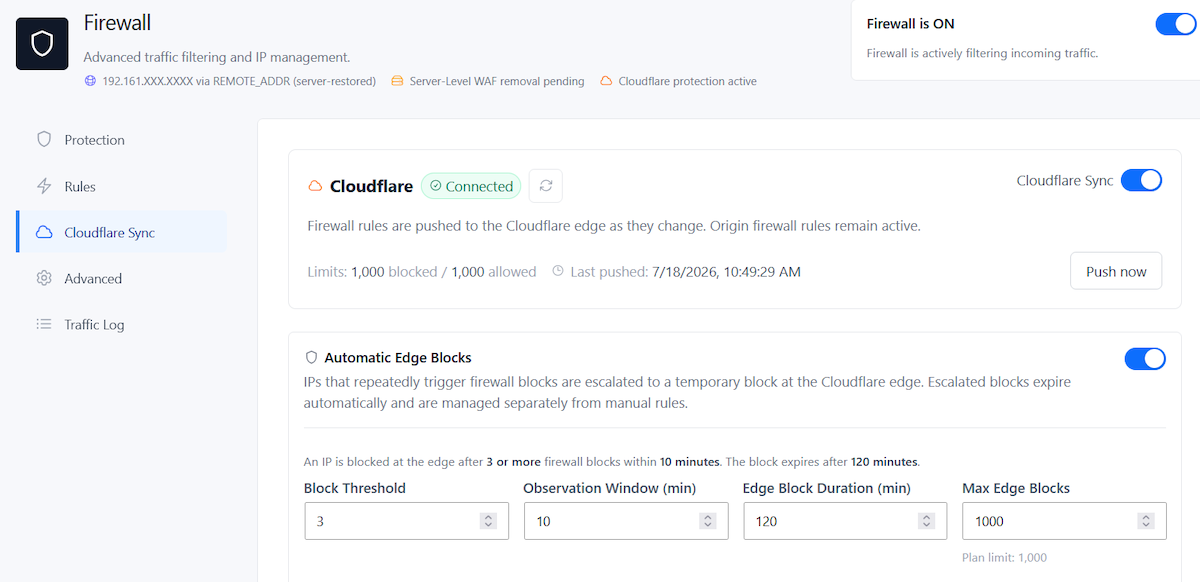
Automatic Edge Blocks for repeat offenders
Static block rules work when you already know what you want to deny. Automated scanning is different because attacker IPs appear, disappear, and rotate constantly.
SiteFort’s Automatic Edge Blocks are designed for repeated firewall violations. When the same IP triggers enough blocks within the configured observation window, SiteFort can temporarily escalate that address to Cloudflare.
You control the threshold, observation period, edge-block duration, and maximum number of active temporary blocks. SiteFort also accounts for the limits available on the connected Cloudflare plan.
The temporary rule expires automatically and is kept separate from permanent manual blocks.
In practice, this means an IP may reach the site long enough for SiteFort to identify repeated hostile behavior. Once it is escalated, further matching requests through Cloudflare are rejected before they reach WordPress.
That is more useful than keeping the same noisy scanner trapped in a loop where your origin has to reject every request itself.
Do not leave the origin open behind Cloudflare
Edge blocking only works for traffic that actually passes through Cloudflare.
If someone discovers the server’s real IP address and the origin accepts direct public HTTP or HTTPS connections, they may be able to bypass Cloudflare and send requests straight to the server.
Where the hosting environment allows it, protect the origin by keeping web-facing DNS records proxied and restricting direct web access to Cloudflare’s IP ranges plus any services that genuinely need direct access.
This is particularly worth checking on older sites where historical DNS records, mail services, staging hosts, or old subdomains may have exposed the origin address.
Setting up Cloudflare Sync
If your domain already runs through Cloudflare, the setup is straightforward.
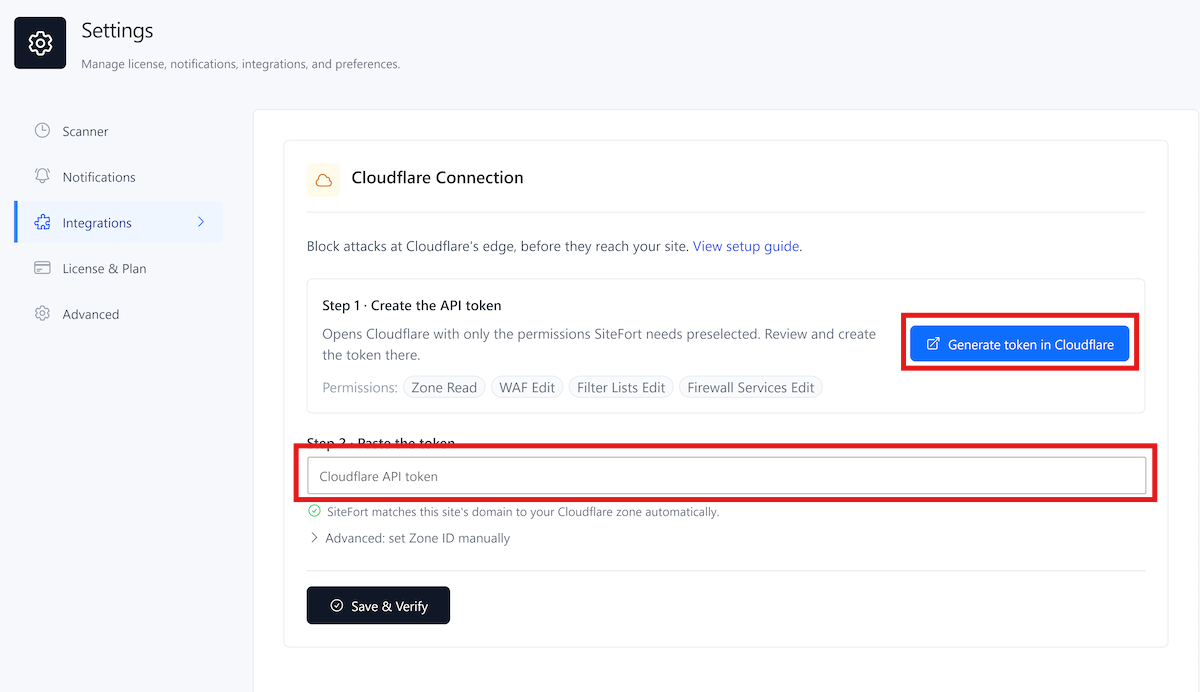
- Connect Cloudflare. Go to SiteFort > Settings > Integrations and create the Cloudflare connection. The Cloudflare connection guide covers the required token permissions.
- Verify the connection. SiteFort checks the token, identifies the correct zone, verifies permissions, and detects the connected Cloudflare plan.
- Enable Cloudflare Sync. Open SiteFort > Firewall > Cloudflare Sync and enable edge synchronization.
- Review Automatic Edge Blocks. Set the trigger threshold, observation window, block duration, and maximum active blocks to suit the site.
- Check the origin. If your server allows it, restrict direct HTTP and HTTPS access so traffic cannot simply bypass Cloudflare.
After enabling the integration, keep an eye on the Traffic Log. It shows the requests SiteFort is detecting locally and helps you decide whether your thresholds or firewall rules need adjustment.
What Cloudflare Sync does not replace
Moving a block to the edge reduces the amount of unwanted traffic your server has to process. It does not patch a vulnerable plugin, remove malware, secure a stolen administrator account, or tell you whether a backdoor is already present.
You still need the basics: keep WordPress core, plugins, and themes updated, remove abandoned software, protect administrator accounts with 2FA, harden common attack paths, monitor vulnerabilities, and scan for malware.
Cloudflare and SiteFort handle different parts of that job. Cloudflare is well positioned to stop traffic before it reaches the origin. SiteFort adds the WordPress context needed to identify application-level behavior, along with firewall protection, hardening, login security, vulnerability monitoring, malware scanning, and activity logging.
Cloudflare Sync connects those layers so supported SiteFort blocks do not have to remain origin-only.
Cloudflare Sync is included in SiteFort Free. If your site already uses Cloudflare, connect the existing account under SiteFort > Settings > Integrations, then enable synchronization under Firewall > Cloudflare Sync.
Frequently asked questions
Does Cloudflare replace a WordPress firewall plugin?
No. Cloudflare can stop traffic before it reaches your server and has strong network, HTTP, rate, bot, and threat signals. A WordPress firewall can make decisions using application-specific information such as login failures, local lockouts, authenticated users, sensitive-path probes, and other WordPress activity. They protect different layers.
Does a WordPress firewall use server resources when it blocks a request?
If the firewall runs on the origin, the request has already reached the server. How much work it causes depends on how early the firewall runs. An early PHP or server-level firewall can reject a request before WordPress fully loads, which is much cheaper than processing it normally.
Does Cloudflare blocking use WordPress server resources?
A request successfully blocked at Cloudflare’s edge is not forwarded to the WordPress origin, so it does not use a PHP worker or trigger WordPress processing on that server. This assumes the request is going through Cloudflare rather than directly to an exposed origin IP.
Does SiteFort Cloudflare Sync work with Cloudflare Free?
Yes, supported SiteFort Cloudflare Sync features can work with the Cloudflare Free plan. Cloudflare applies different rule and list limits depending on the plan, and SiteFort detects the connected plan so it can operate within those limits.
Does SiteFort send every firewall rule to Cloudflare?
No. SiteFort keeps its local firewall active and synchronizes supported rules and temporary escalated blocks to Cloudflare. Some protection still belongs at the WordPress or server layer because it depends on application context.
Can attackers bypass Cloudflare and reach WordPress directly?
Yes, if they discover the origin IP and the server accepts direct public web connections. Where practical, restrict HTTP and HTTPS access at the origin to Cloudflare’s IP ranges and any other trusted services that genuinely require direct access.