WordPress Security Plugin

Complete WordPress Security. Zero Server Load.

Cloud-powered scanning, firewall, login protection, and vulnerability monitoring. Your server handles visitors, not security scans. Free forever, no credit card required.
Works on any hosting
No credit card required
4,000+ sites secured
See It In Action

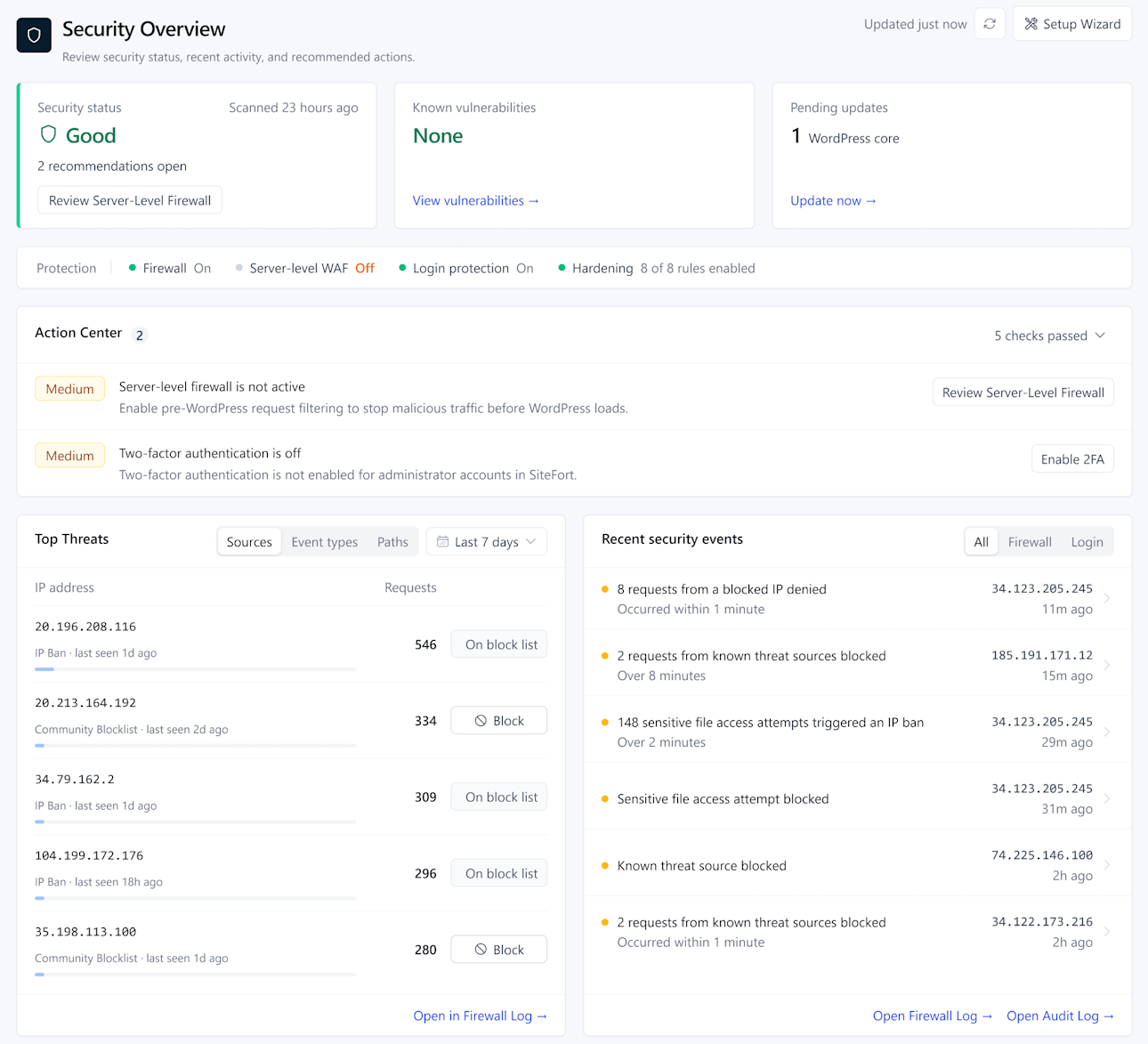
Your Security Workspace Inside WordPress

Malware scanning, firewall, login security, vulnerability monitoring, hardening, and a complete audit trail in one purpose-built interface.

yourdomain.com/wp-admin/admin.php?page=securewp
Securewp Dashboard
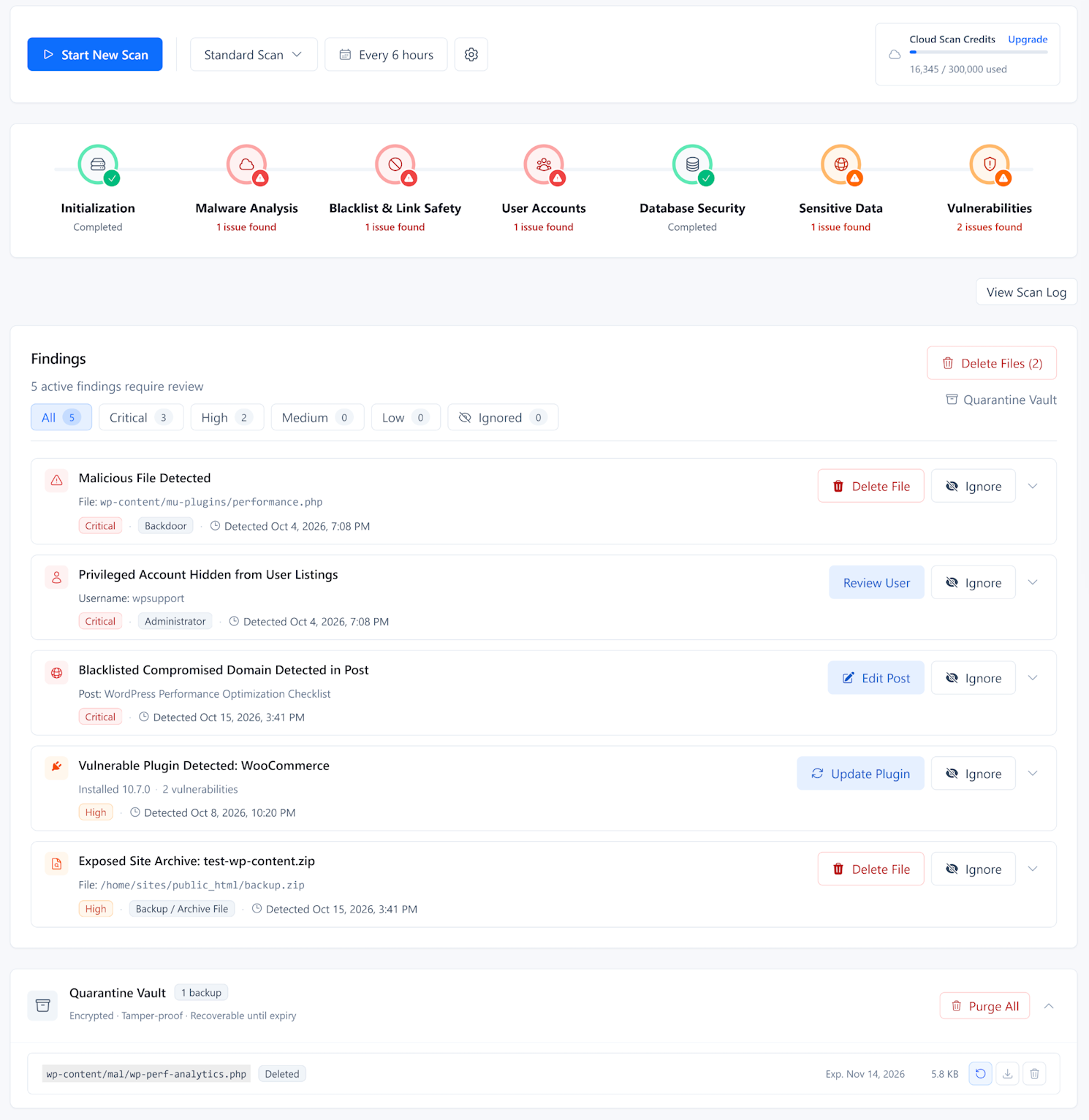
Securewp Malware Scanner
Securewp Firewall Rules Settings
Securewp Login Security
Securewp Hardening
Securewp Vulnerability Checker
Securewp Audit Log

How cloud scanning worksvs server-based scanning
1
Plugin collects file signatures on your serverA lightweight hash of each file. Near-zero CPU. No file content leaves your server at this stage.
2
Known files verified instantly against clean databaseWordPress core, popular plugins, and themes are matched against our verified file database. Most files clear in milliseconds.
3
Unknown or modified files go to the cloud for analysisOnly files that don't match a clean signature are uploaded for deep inspection. On most sites this is fewer than 1% of files after the first scan.
4
Results returned with one-click repairInfected files identified by type and severity. Pro users repair directly from the scan results. Cleanup service available if needed.

Cloud Malware Scanner

Reliable Malware Scans on Every Host

Whether you use shared hosting or a budget VPS, our off-site analysis bypasses host-imposed limits. Get comprehensive file and database protection without the risk of process kills or site slowdowns..

Analysis runs on our cloud, not your serverNo PHP timeouts. No memory exhaustion errors. No host-imposed process kills. The heavy analysis runs on Securewp infrastructure. Your server does the lightweight work of collecting file signatures.
Covers files, database, and core integrityFile scanning detects backdoors, webshells, and injected code. Database scanning catches spam injections and malicious redirects stored in WordPress options. Core file integrity checks verify WordPress itself against official checksums.
One-click repair for infected filesWhen malware is found, scan results show exactly which files are infected, what type of threat was detected, and the severity. Pro users can repair infected files directly from the results without manual file cleanup.

VULNERABILITY MONITORING

Find Vulnerabilities before Hackers Do

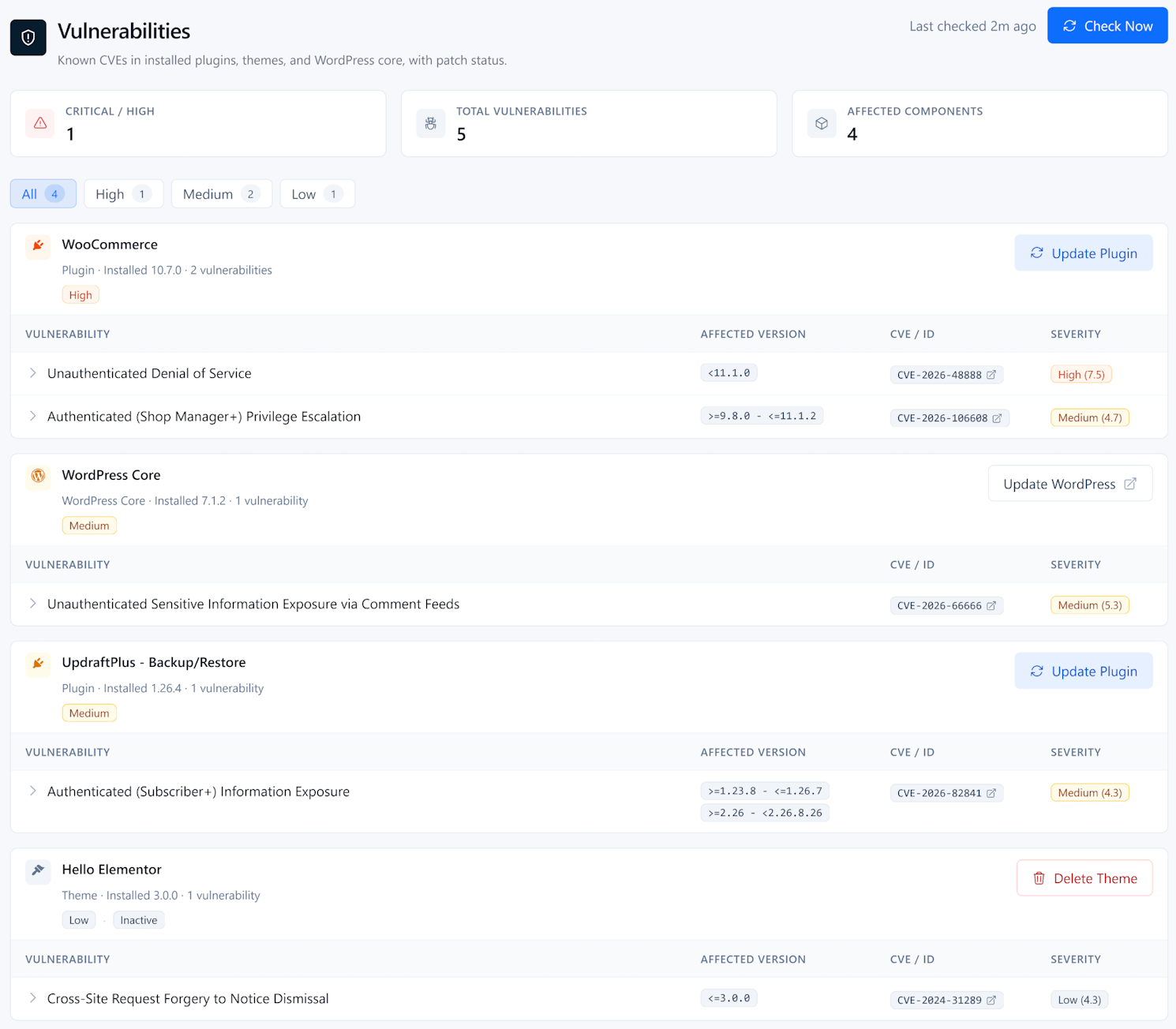
Most WordPress hacks exploit known security gaps that already have a fix available. SecureWP monitors your entire stack, alerting you the moment a weakness is discovered so you can secure your site before an attack happens.

Prioritize what matters mostEvery finding includes a severity score and CVE reference so you know exactly which risks to fix first.
Complete stack monitoringSecurewp scan every plugin, theme, and WordPress core file. Even inactive themes are monitored to ensure no backdoors are left open.
Instant one-click fixesWhen a patch is available, you can update the vulnerable software directly from your report without leaving the page.
Securewp → Vulnerabilities
Dashboard
Scanner
Firewall
Login
Hardening
Vulns
Audit Log
Page Builder Plugin
Plugin · Installed: 3.11.5 · 2 issues
Update Plugin
VulnerabilityAffectedCVESeverity
Broken Access Control<=3.35.5CVE-2026-32445Low (2.7)
Stored Cross-Site Scripting via REST API<=3.35.5CVE-2025-14732Medium (6.4)
Contact Form Plugin
Plugin · Installed: 1.6.13 · 2 issues
Update Plugin
VulnerabilityAffectedCVESeverity
Cross Site Scripting (XSS)<2.5.0CVE-2025-9703Medium (5.9)
Missing Authorization on Settings Update<=2.4.6CVE-2025-8488Medium (5.4)

Site Hardening

Lock the Doors That WordPress Leaves Open

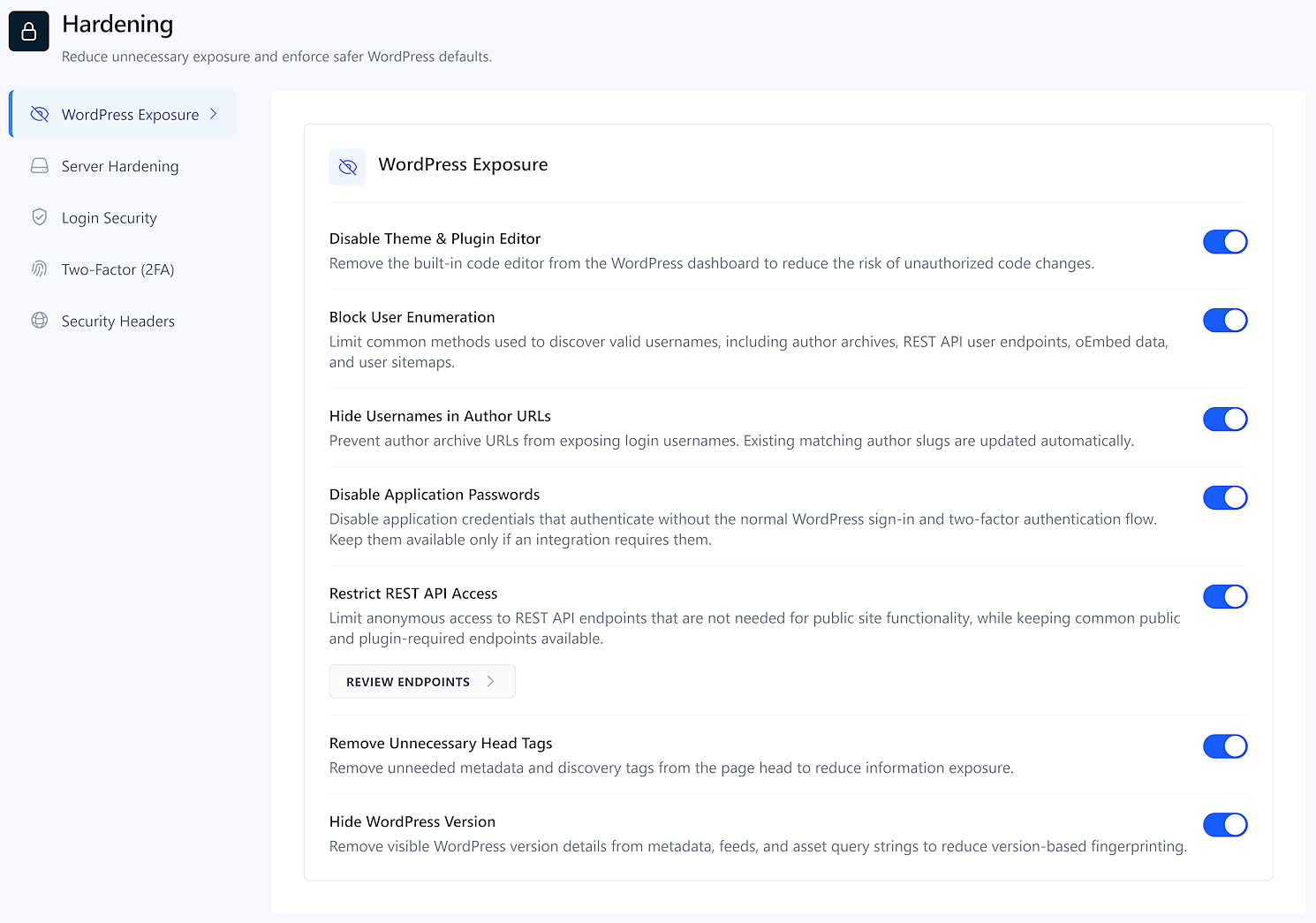
Default WordPress settings often leak system information to attackers. Our hardening suite closes these gaps instantly, blocking unauthorized access to sensitive files and preventing rogue scripts from running in your uploads folder.

Deep Server HardeningInstantly block PHP execution in uploads and theme folders while restricting access to sensitive system files like .env or debug logs.
Information Leak PreventionHide version numbers, clean your HTML head, and block username discovery to stop attackers from mapping out your site.
One-Click Deployment (No Server Access)Apply advanced security configurations directly from your WordPress dashboard without ever touching an .htaccess file or logging into SSH.
Securewp → Hardening
Dashboard
Scanner
Firewall
Login
Hardening
Vulns
Audit Log
Server Hardening
Block Sensitive File AccessBlocks public access to .env files, debug logs, .git metadata, database backups, and server configuration fragments. Credential exposure is one of the most common causes of full site compromise.
Block PHP Execution in UploadsPrevents attackers from executing PHP files in the uploads directory. WordPress never runs PHP from uploads — only malware does.
Block Direct PHP Access in PluginsEnsures plugin PHP files only run when loaded by WordPress core, not when accessed directly via URL.
Block Direct PHP Access in ThemesEnsures theme PHP files only run when loaded by WordPress core, not when accessed directly via URL.
Disable Directory ListingPrevents visitors from browsing folder contents when no index file is present, hiding backup files and configuration resources.
WordPress Obscurity
Block User EnumerationBlocks username discovery via author scanning, REST API user endpoints, oEmbed data, and user sitemaps.
Disable Theme & Plugin EditorRemoves the built-in code editor from the dashboard, preventing PHP injection through the admin panel.
Disable Application PasswordsRemoves Application Passwords, which bypass two-factor authentication. Disable unless required by external apps.
Hide WordPress VersionRemoves version numbers from meta tags, RSS feeds, and script query strings to prevent fingerprinting.
Clean WordPress HeadRemoves unnecessary meta tags, manifest links, and feed discovery links from the HTML head.

Login Protection

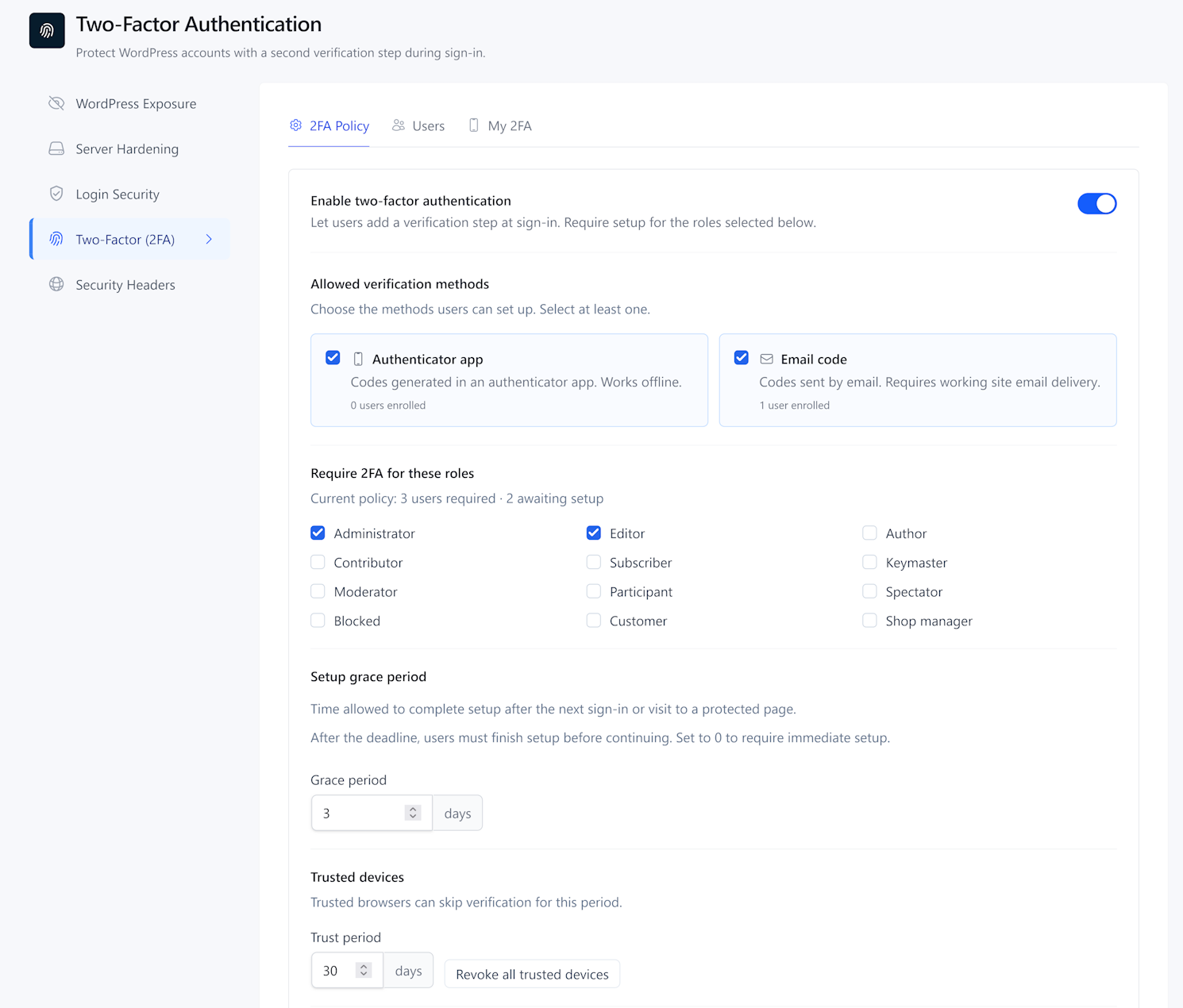
Lock Down Your WordPress Login

Hackers constantly target your site using automated bots and stolen passwords. Securewp provides complete WordPress login security by combining Two-Factor Authentication (2FA), compromised password blocking, and a hidden login page. Lock down your WordPress dashboard in minutes and keep unauthorized visitors out for good.

Role-Based Two-Factor AuthenticationEnforce 2FA for administrators, editors, or all users independently. Supports authenticator apps and email-based verification.
Proactive Password ProtectionPasswords are automatically checked against global data breach databases. If a user attempts to log in with a compromised credential, they are forced to reset it immediately.
Custom Secret Login URLEliminate your biggest target entirely, removing the primary target for brute force and credential stuffing attacks before they reach WordPress.
Securewp → Login Security
Dashboard
Scanner
Firewall
Login
Hardening
Vulns
Audit Log
Two-Factor AuthenticationRequired: Administrator, Editor
4 8 3 · 2 1 6
Expires in 18s · Google Authenticator
Limit Login Attempts5 fails per IP · lock out 30 min
847 attempts blocked today14 IPs locked
72% of attack traffic stopped at login layer
Bot Detection (CAPTCHA)
Google reCAPTCHA or Cloudflare Turnstile
Active
Secret Login URL
yoursite.com/my-login
403404Redirect

The Most Powerful Free WordPress Security Plugin.

Hardening, login protection, bot filtering, traffic rules, and Cloudflare WAF sync are all available on the free plan. Start today with no credit card required.

Install Free Plugin

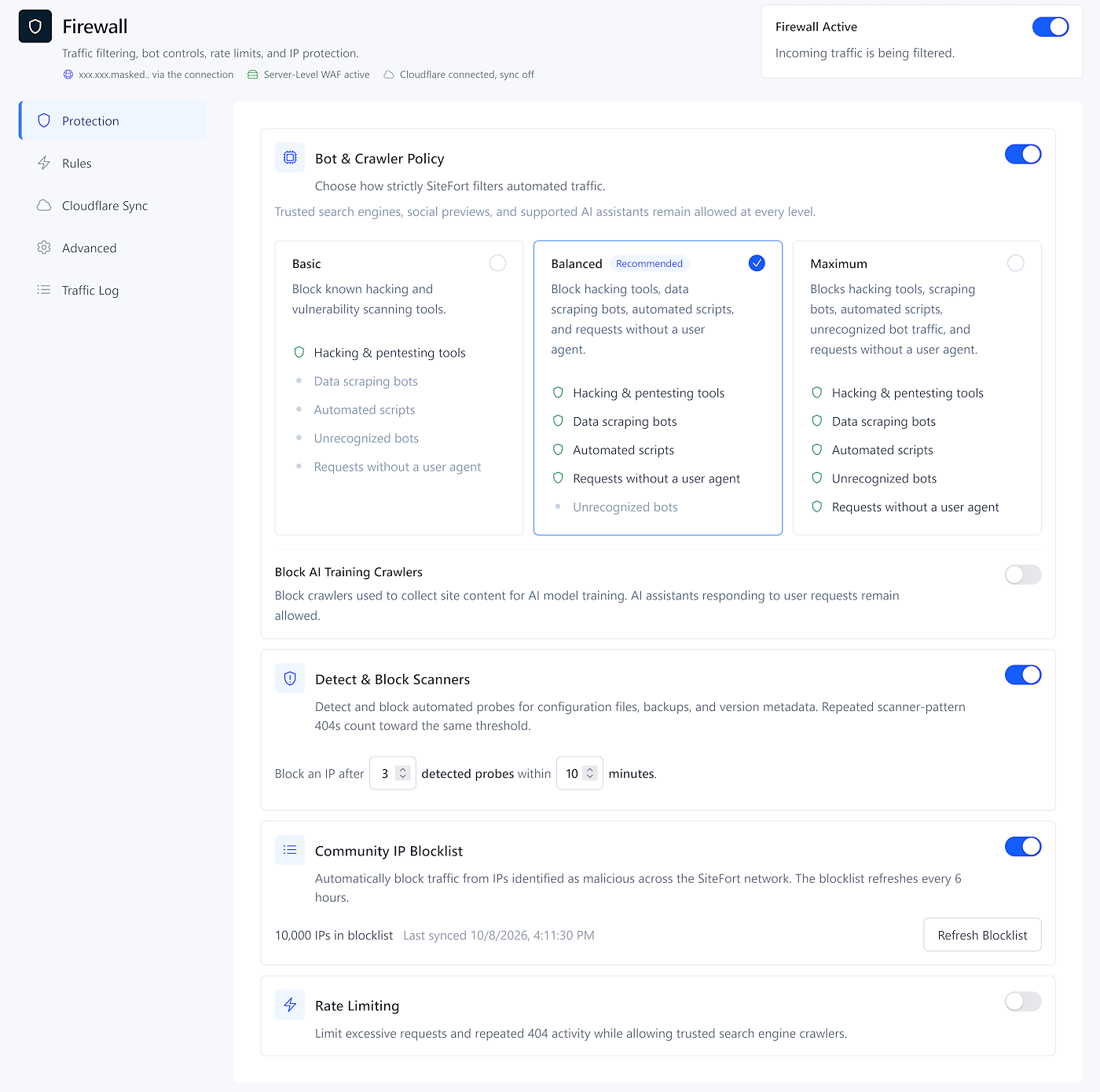
Bot & Crawler Policy

Stop Bad Bots Without Hurting Your WordPress SEO

Automated attack tools, scrapers, and vulnerability scanners consume your server resources and probe your site for weaknesses. Securewp filters out this malicious traffic with a simple three-tier policy. You can block bad bots instantly without ever worrying about your search rankings, as established search engine crawlers are always recognized and allowed to pass through safely.

Simple Three-Level ProtectionChoose between Basic, Balanced, or Maximum security. Instantly block vulnerability scanners, data scrapers, and unrecognized automated scripts with a single click.
100% Safe for Search Engine CrawlersGood bots are always welcome. Securewp automatically recognizes search engines and major AI crawlers, ensuring your WordPress SEO rankings and site indexing are never interrupted.
Automatically Block Vulnerability ScannersStop hackers before they even find a weakness. Securewp firewall detects and drops automated tools that probe your plugins and themes for known exploits.
Securewp → Firewall → Bot & Crawler Policy
Search engine crawlers and major AI crawlers are recognised automatically and pass through at every level.
Basic

Block known hacking and vulnerability scanning tools.

Hacking tools
Scrapers
Auto scripts
Unknown bots
Balanced
Recommended
Hacking tools
Scrapers
Auto scripts
Unknown bots
Maximum

Blocks all unrecognised bot traffic.

Hacking tools
Scrapers
Auto scripts
Unknown bots
Detect & Block Scanners

Detects and bans IPs probing for config files, backups, and version metadata.

Ban IP after3failed attempts within11minutes

Traffic Rules

Take Total Control of Your WordPress Traffic

Stop specific attackers and unwanted visitors before they reach your site. Securewp allows you to block malicious IP addresses, restrict access from entire countries, and stop data scrapers by name. If you use Cloudflare, Securewp automatically syncs your rules to the network edge to block threats before they ever touch your server.

Advanced IP and Range BlockingEasily block a single IP or an entire subnet range to stop persistent attackers. You can set blocks to be permanent or temporary and protect your own access with one-click allowlisting for your current IP.
One-Click Country BlockingSecure your site from high-risk regions with a single click. When Cloudflare sync is active, these rules are pushed to the global network edge to stop regional traffic instantly without taxing your server resources.
Block Scrapers and Named BotsStop specific tools like SemrushBot or AhrefsBot from crawling your site and stealing your content. Use custom User-Agent rules to filter out data scrapers while ensuring your preferred SEO tools always have access.
Securewp → Firewall → Traffic Rules
IP Address
Country
Bot / Crawler
Duration:Reason:
Allow my current IP

Active Rules

185.220.101.47BlockPermanent
45.142.212.0/24BlockPermanent
203.0.113.5AllowMy IP

Cloudflare Integration

Stop Attacks at the Edge Before They Reach Your Server

Most security plugins block threats only after they reach your website, which still consumes your server memory and bandwidth. Securewp syncs your firewall rules directly to Cloudflare, neutralizing malicious traffic at the network edge across 300+ global locations.

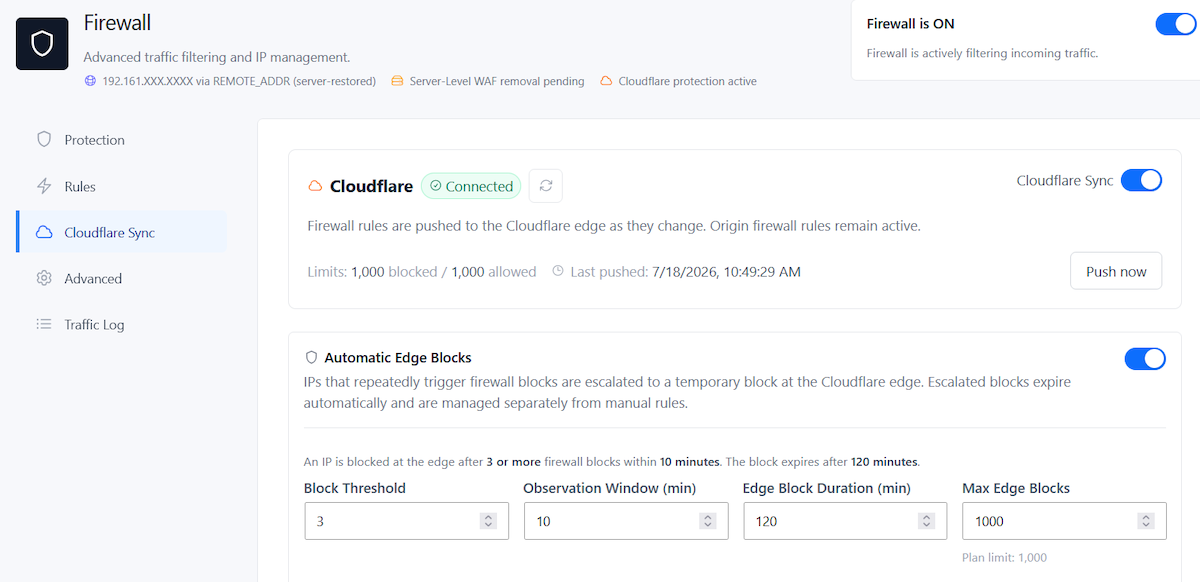
Automatic Cloudflare Rule SyncingSeamlessly sync your IP and country blocks to the Cloudflare Web Application Firewall. As you add new rules in your WordPress dashboard, Securewp pushes them to the edge automatically so your protection is always up to date.
Smart Edge Blocks for Active AttackersWhen an IP repeatedly triggers your firewall, Securewp automatically escalates the block to Cloudflare. This prevents bots from draining your bandwidth during brute force or scraping attempts.
Powerful Dual-Layer ProtectionCloudflare handles volume attacks at the edge. Securewp's PHP-level firewall and bot policy cover anything that passes through. Both layers operate independently.
Securewp → Firewall → Cloudflare
Cloudflare Connected
Cloudflare Sync

Firewall rules are actively synced to Cloudflare. Toggle off to stop pushing rules to the edge.

Plan: FreeLimits: 1,000 blocked / 1,000 allowedLast pushed: just now
Automatic Edge Blocks for Active Attacks

When an IP repeatedly triggers firewall blocks, Securewp automatically escalates it to a temporary Cloudflare edge block.

An IP is added to Cloudflare when it triggers 3 or more blocks within 10 minutes. The edge block lasts 120 minutes.

Block Threshold
3
Violations before Cloudflare blocks
Window (min)
10
Time window for counting blocks
Block Duration
120
Minutes Cloudflare holds the block
Max Blocks
999
Simultaneous edge blocks managed

Security Audit Log

See Exactly Who Did What on Your Site, and When

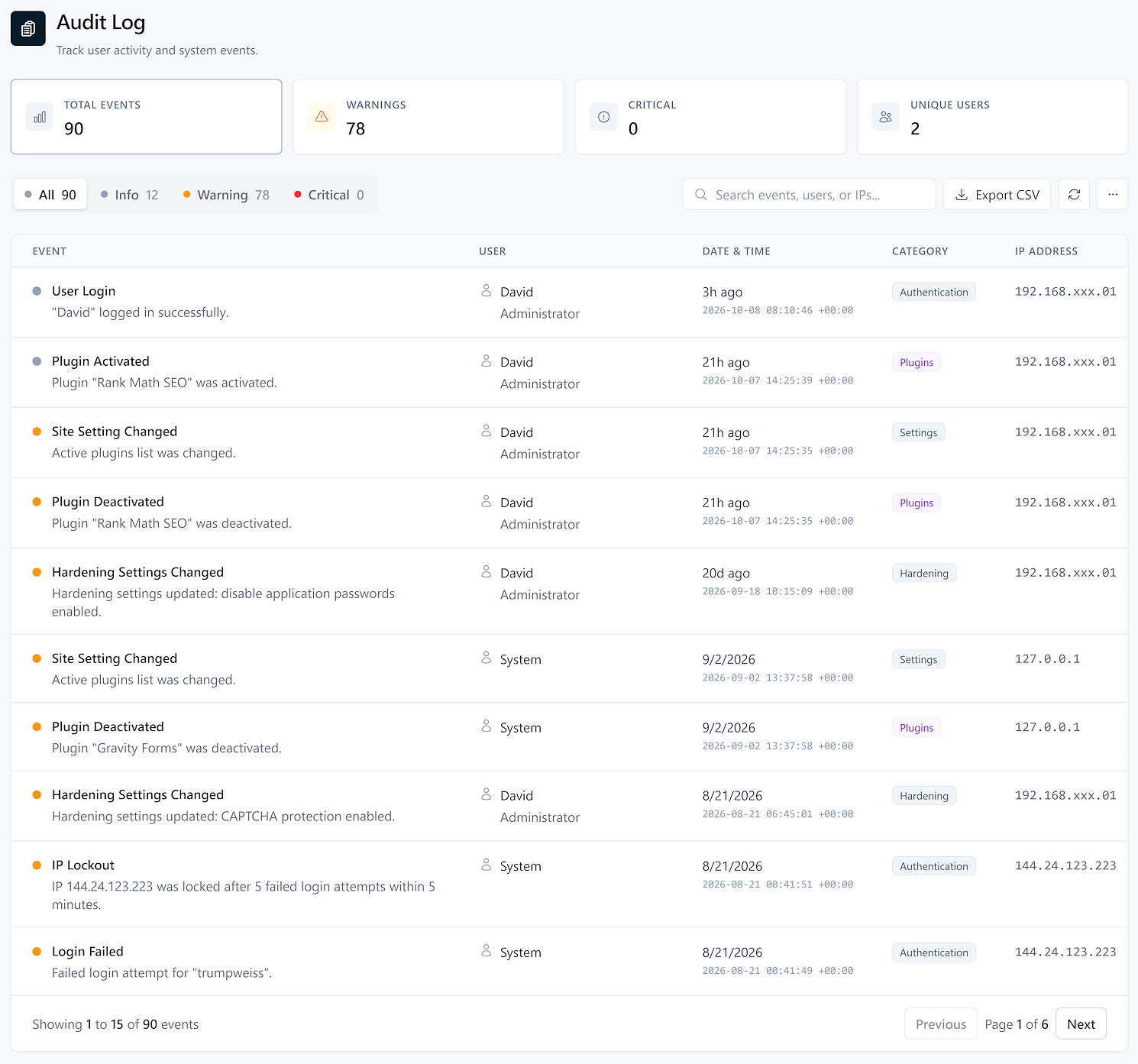
Stop the guesswork when settings change or unknown logins occur. Securewp maintains a detailed WordPress activity log that records every security-relevant event across your site. Whether you are managing a team or a single site, our audit trail provides the transparency needed to troubleshoot issues and maintain total accountability.

Detailed Action AttributionEvery entry in the log is tied to a specific user account, IP address, and timestamp. If a plugin is deactivated or a file is modified overnight, you will know exactly who was responsible.
Rapid Incident InvestigationFind any event in seconds using advanced severity filtering. Search your history by event type, username, or IP address to quickly identify the source of an issue and react before it spreads.
Professional Agency ReportingDownload timestamped, IP-attributed CSV files for client security reports or compliance needs. Provide clear evidence of site maintenance and security monitoring for GDPR, SOC 2, or PCI-DSS requirements.
Securewp → Audit Log
Total events
100
Warnings
67
Critical
0
Unique users
3
All 100Info 33Warning 67Critical 0
Search events, users, or IPs...
EventUserDate & TimeCategory
User Login
admin logged in successfully
System2026-04-13 17:21Authentication
Plugin Deactivated
Plugin "Contact Form" was deactivated
jsmith2026-04-06 08:56Plugins
Site Setting Changed
Active plugins list was changed
jsmith2026-04-06 08:56Settings
User Login
admin logged in successfully
System2026-04-01 08:42Authentication
Plugin + Console

Manage Your Entire WordPress Portfolio from One Screen

Stop wasting time switching between client sites. The Securewp Console provides a centralized hub to monitor security status, uptime, and SSL health for every site you manage. Whether you have five sites or five hundred, you can run scans and apply security presets across your entire network without ever needing individual login credentials.

Remote Scans & Bulk Actions

Execute malware scans or apply security hardening presets to any connected site instantly from the console. Results are reported back to your main dashboard, eliminating the need to manage multiple browser tabs.

Integrated Uptime & SSL Tracking

Get a birds-eye view of your site health with real-time uptime monitoring and SSL expiration tracking. If a site goes down or a certificate nears its end date, you will see it in the console before your clients do.

White-Label Agency Reporting

Generate professional security audits and PDF reports for your clients. Pro users can brand these reports and assign specific team roles to manage different segments of their portfolio securely.

console.securewp.net
Sites

Sites

4

Risk Queue

1

Uptime

99.9%

All 4Secure 3Attention 1Scanning 0

clientstore.com

WP 6.9 · PHP 8.3 · Pro

Secure

agency-blog.net

WP 6.8 · PHP 8.2 · Pro

1 Vuln

shop.mybrand.co

WP 6.9 · PHP 8.3 · Managed

Secure

developer-portfolio.io

WP 6.9 · PHP 8.3 · Free

Secure

What Competitors Charge For. We Include Free.

Wordfence Premium costs $119/year. Sucuri starts at $199/year. iThemes Security Pro is $99/year. Features like country blocking, breach detection, CAPTCHA, Cloudflare WAF sync, and unlimited audit log retention are all locked behind those paywalls. Every one of them is included in Securewp's free plan.

Country Blocking
Block traffic from entire countries at the firewall level. A paid feature in leading security plugins, free in Securewp.
Community Threat Blocklist
A shared IP blocklist updated continuously from threat data across all Securewp installations. Paid-only in other plugins.
Activity Log with Unlimited Retention
Keep your full security history as long as you need. Stored locally, no forced expiry, no upgrade required.
Password Expiration & Breach Detection
Enforce password rotation and check credentials against known breach databases. Paid-only in other plugins.
CAPTCHA on Login
Bot-resistant login protection using modern CAPTCHA. A premium add-on in competing plugins.
Cloudflare WAF Integration
Sync firewall rules to your Cloudflare WAF directly from the plugin dashboard. Works with the Cloudflare free plan.
Security Headers (CSP, HSTS)
Set Content Security Policy, HSTS, X-Frame-Options, and more directly from the plugin — no .htaccess editing.
IP & Domain Reputation Check
Scan your site's IPs and linked domains against global blacklists. Paid-only in other plugins.

Simple Pricing

Security for every stage

Start for free, upgrade as you grow. No hidden fees.

Starter

Essential protection for personal sites.

$0/forever
  • 3,000 Scan Credits/mo
  • Firewall & Country Blocking
  • Login Protection & 2FA
  • Security Hardening
  • Activity Logging
POPULAR
Pro

Advanced security for growing businesses.

$99/year
  • Unlimited Scans
  • Deep Scan Mode
  • Scheduled & Automated Scans
  • Uptime Monitoring
  • Slack, Discord & Email Alerts
  • 50% Off Expert Cleanup
Managed

Hands-off security for serious sites.

$250/year
  • Everything in Pro
  • Dedicated Security Agent
  • Free Expert Malware Cleanup
  • Core, Plugin & Theme Updates
  • Vulnerability Patching
  • 24/7 Priority Monitoring

HAVE QUESTIONS?

Frequently Asked Questions

SecureWP generates file signatures (hashes) locally on your server. These hashes are checked against our cloud database of known-clean files. Only files that are unknown or suspicious are securely uploaded for deep analysis. Most files never leave your server at all. After the first scan, verified files are cached with cryptographic signatures, so repeat scans are even faster.

No. Unlike traditional security plugins that run malware analysis on your server, SecureWP offloads the heavy work to our cloud infrastructure. The plugin also includes automatic throttling that reduces activity if your server is under load. Your visitors will not notice any difference during scans.

The free plan includes 3,000 cloud scan credits per month, the full firewall with country blocking, community threat blocklist, login protection with 2FA, brute force lockout, CAPTCHA, all hardening features, breached password detection, activity logging, and the security console. These are not stripped-down versions. Features like country blocking and community blocklists are paid-only in competing plugins.

Each file analyzed by the cloud scanner costs one credit. Free plans get 3,000 credits per month. A typical WordPress site with a few plugins has 5,000 to 8,000 files, so most free users can run a full scan every month. After the first scan, unchanged files are verified from cache at no credit cost, so follow-up scans use far fewer credits. Pro plans have unlimited credits.

Yes. SecureWP can sync firewall rules directly to your Cloudflare WAF from the plugin dashboard. IP blocks and rate-limiting rules applied in SecureWP are pushed to Cloudflare automatically, so malicious traffic is stopped at the edge before it reaches your server. This works alongside the plugin's built-in PHP-level firewall for layered protection.

Yes. The SecureWP console gives you a centralized dashboard for all your sites. You can trigger scans remotely, view security status across your portfolio, manage firewall rules, and receive Slack or Discord alerts. Team roles (owner, admin, operator, viewer) let you control access for your entire team. Pro users managing 5 or more sites get volume pricing at $79 per site per year.

Every scan covers seven security modules: cloud malware detection (files and database), file integrity monitoring against official WordPress checksums, vulnerability checks for all installed plugins and themes, server IP and domain reputation, sensitive data exposure (.env, wp-config backups, SSH keys), user account auditing (ghost admins, weak passwords), and server configuration analysis. Pro users also get deep scan mode, which checks images and PDFs for embedded malicious code.

You get a clear report showing exactly which files are infected, what type of malware was found, and the severity level. Pro users can repair infected files with one click directly from the scan results. If the infection is complex or you prefer hands-off help, our expert cleanup service is available for $99 (50% off with Pro, free with Managed). Every cleanup includes a 1-year reinfection warranty.

Managed is for site owners who want complete hands-off security. Our team installs and configures the plugin, runs daily automated scans, applies security patches and updates, monitors your site 24/7, and handles any malware removal at no extra cost. You get a dedicated security agent and real-time chat support through the console. It includes everything in Pro plus proactive maintenance and a 1-year support guarantee.

Yes, and that is where it shines most. Traditional security plugins often fail on shared hosting because they consume too much CPU and memory, causing timeouts or host-imposed kills. SecureWP's cloud architecture means the heavy analysis runs on our servers, not yours. The plugin also includes automatic throttling that backs off if your server is under pressure. Scans complete reliably regardless of your hosting plan.

Yes. Pro and Managed plans come with a 30-day satisfaction guarantee. If SecureWP is not the right fit, contact support through your console or email support@securewp.com within 30 days of purchase for a full refund. No questions asked.