Automated traffic is becoming a growing burden on websites. Traditional content scrapers, vulnerability scanners, and malicious bots are now joined by AI crawlers and data collection services generating large volumes of requests across the web.
Not all bots are malicious, but excessive crawling can consume server resources, slow down websites, and increase hosting costs. For WordPress, repeated requests to dynamic pages can be particularly disruptive, even when no security vulnerability is exploited.
Why Bot Traffic Is Becoming a Bigger Problem
According to Imperva’s 2026 Bad Bot Report, automated traffic accounted for more than 53% of measured web traffic in 2025, up from 51% the previous year. This includes legitimate crawlers as well as unwanted bots.
Cloudflare’s 2025 Year in Review found that identified AI bots accounted for an average of 4.2% of HTML requests across its network, excluding Googlebot. Beyond major AI providers, smaller startups and data scrapers are collecting content from knowledge bases, product directories, deals websites, and other information-rich sources.
The impact can be serious. In one case, a grocery deals website experienced repeated outages while Cloudflare recorded more than 80,000 mitigated requests associated with AI crawler infrastructure. Those requests don’t establish the cause of the outages, but they show how much automated activity even a relatively small website can attract.
Identifying these bots isn’t always straightforward. Some scrapers impersonate trusted crawlers such as Googlebot or ClaudeBot, while others rotate user-agent strings to evade blocking. A recognizable crawler name alone doesn’t prove a request is legitimate.
How Bad Bots Affect WordPress Performance and Hosting Costs
Not every request places the same load on a server. Cached pages can often be delivered without running WordPress, while dynamic requests may require PHP execution, database queries, and plugin processing.
For example, a scraper repeatedly requesting WooCommerce product filters, search results, or different URL variations can generate substantial server work. When requests accumulate, they compete with genuine visitors for CPU, memory, and available PHP workers.
Thousands of cached requests may place less load on a server than a much smaller number of expensive dynamic requests. Excessive traffic can therefore cause slow pages, timeouts, and temporary outages, even without a successful attack.
The financial impact depends on the hosting environment. Shared hosting accounts may exhaust resource limits, while cloud or usage-based hosting can incur additional processing and bandwidth charges.
More crawling doesn’t necessarily bring more visitors, either. Cloudflare’s research on AI crawling and referrals found substantial differences between how frequently AI services retrieve website content and how much referral traffic they generate.
Why Excessive Bot Traffic Often Goes Unnoticed
Google Analytics automatically filters known bots and spiders, and many automated clients never execute its tracking code. A website can therefore report relatively normal visitor activity while handling thousands of additional requests.
However, requests blocked or served by a CDN don’t necessarily reach the hosting server. Identifying the actual performance impact requires comparing traffic patterns with server resource usage.
What SiteFort Threat Intelligence Reveals
SiteFort’s Network Threat Intelligence data provides a closer look at the types of unwanted traffic targeting WordPress websites.
During a recent seven-day period, Network Threat Protection accounted for 56.7% of recorded security blocks, followed by automatic IP bans at 26.3% and brute-force protection at 16.3%. Sensitive path probes and malicious bot detections accounted for less than 1% combined.
These percentages describe recorded firewall events, not the share of all website traffic or the number of unique attackers.
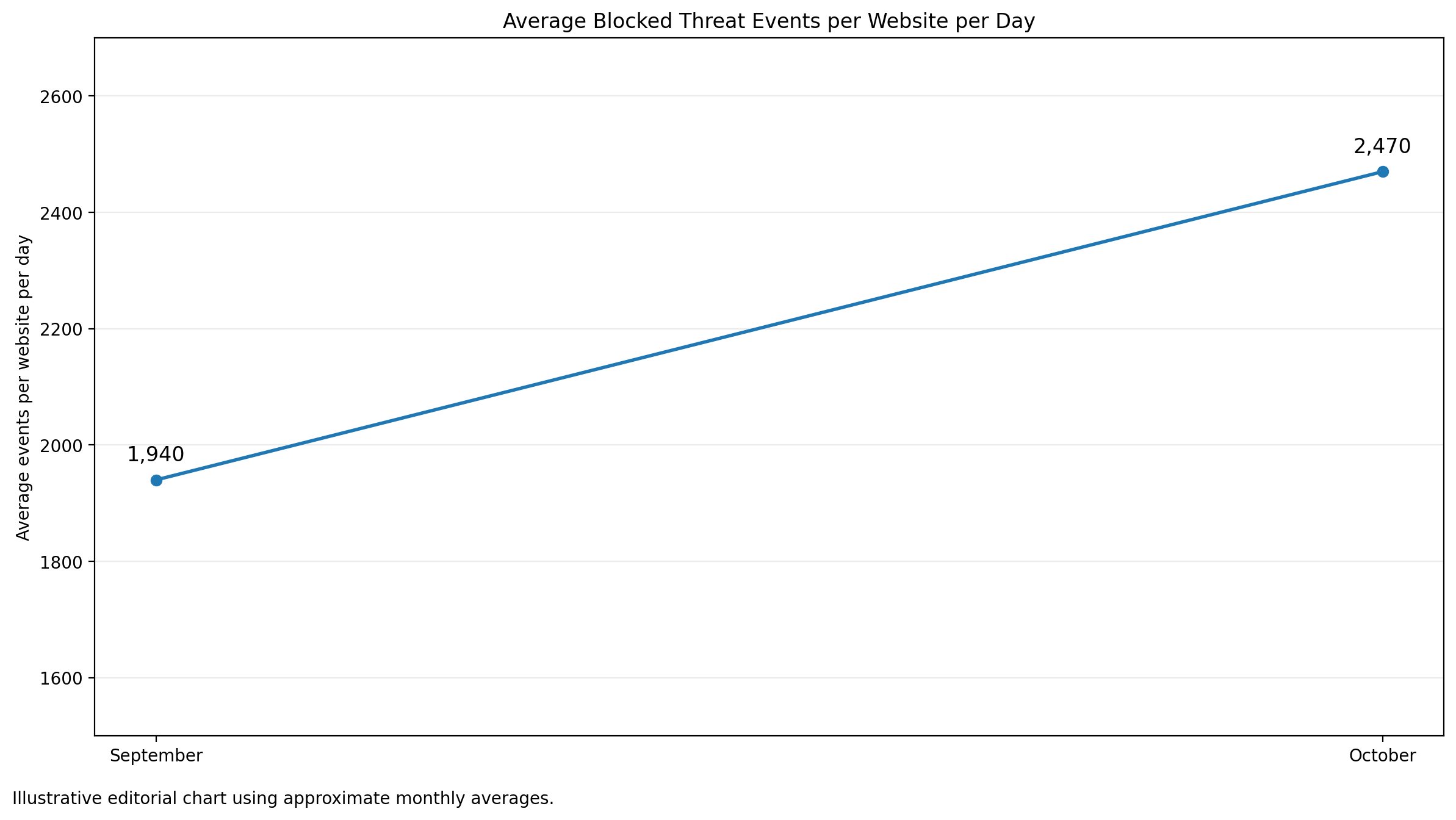
For tracking changes over time, average daily blocks per website provide a more useful comparison than total network-wide activity. The chart below illustrates this reporting approach using example values; verified historical measurements are needed to establish an actual monthly trend.
How to Identify Bad Bot Traffic on WordPress
Unexplained CPU spikes, repeated requests to the same URLs, and unusually high server load can indicate excessive bot activity. Before upgrading hosting or applying broad restrictions, it’s worth checking what the website is actually processing.
- Review traffic and security logs. Check hosting access logs or firewall records for repeated requests, unusual sources, and heavily targeted URLs. CDN analytics can provide additional visibility where available.
- Compare traffic with server usage. Check whether request spikes coincide with increased CPU usage, memory pressure, or exhausted PHP workers.
- Verify suspicious crawlers. Examine request patterns and user agents, but don’t trust crawler names alone. Use published IP ranges, DNS verification, or other supported identity checks where available.
A firewall traffic log can make this investigation easier. The following example shows a 24-hour overview from SiteFort, the WordPress security plugin developed by Securewp.
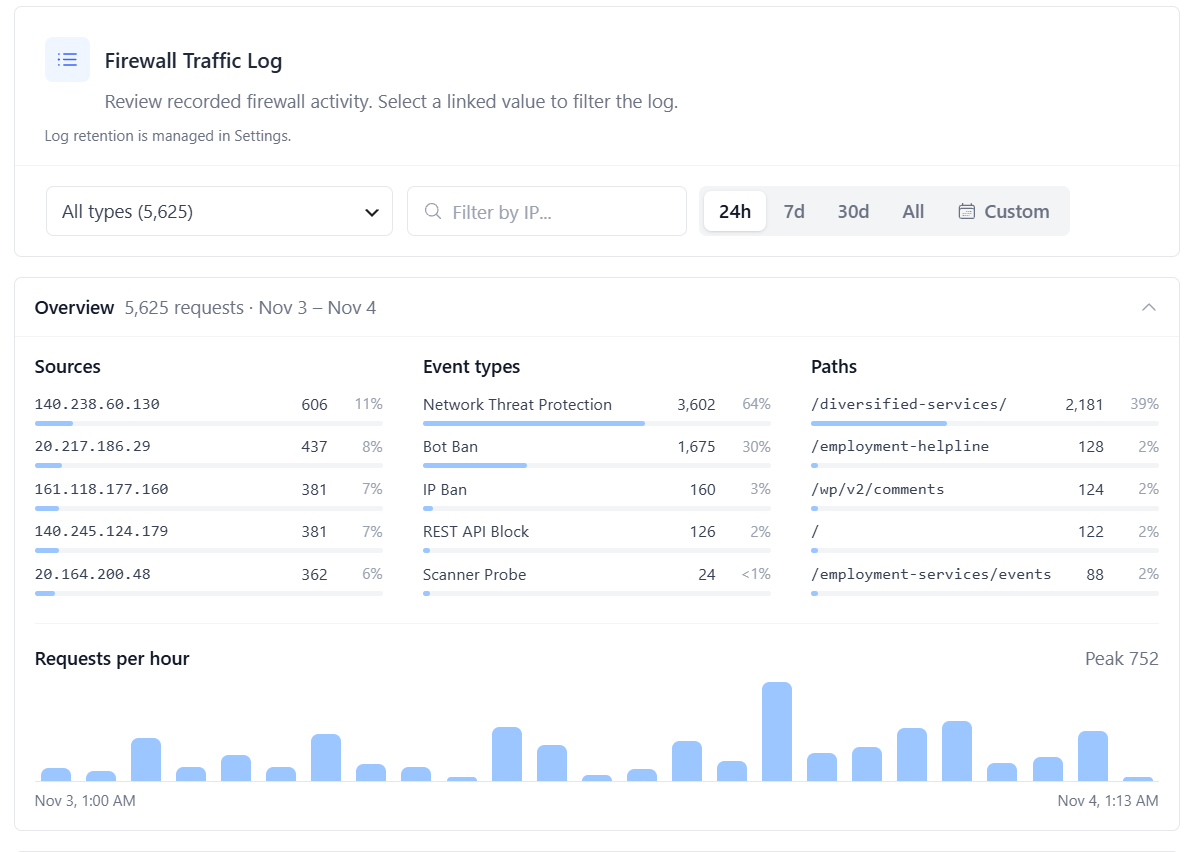
In this example, SiteFort recorded 5,625 firewall events in 24 hours, with one URL path accounting for 2,181 requests. The overview shows which sources repeatedly trigger protections, which URLs receive the most attention, and when activity increases.
SiteFort also allows filtering by IP address, event type, and requested path to investigate matching requests. These records represent firewall activity rather than the website’s total traffic.
High server usage isn’t always caused by bots. Slow plugins, database queries, scheduled tasks, and caching problems can produce similar symptoms, so traffic patterns should be checked against actual resource usage.
How to Reduce Bad Bot Traffic Without Hurting SEO
Blocking every bot isn’t practical. Search engines need access to index websites, and some AI search services or assistants may provide useful discovery and referrals.
The goal is to control unwanted automation without interfering with legitimate visitors or trusted crawlers.
- Apply targeted bot policies and rate limiting. Restrict aggressive scrapers, repeated login attempts, and excessive requests without blocking every unfamiliar client.
- Verify trusted crawlers. User-agent strings can be spoofed, so crawler exemptions should use stronger identity checks where available.
- Improve caching. Serve public pages from cache where appropriate and investigate frequently requested URLs that unnecessarily trigger WordPress processing.
- Block unwanted requests early. A server-level firewall can reject traffic before WordPress loads, while CDN or edge protection can stop selected requests before they reach the hosting server.
SiteFort provides configurable Bot & Crawler Policies, rate limiting, Network Threat Protection, and separate controls for supported AI training crawlers. Recognized search engines and supported AI assistants can remain accessible under their respective policies.
Its Server-Level WAF, where supported and enabled, can reject unwanted requests before WordPress loads. For websites using Cloudflare, SiteFort can also synchronize supported firewall blocks and escalate repeat offenders to Cloudflare’s edge, reducing unnecessary requests reaching the origin server.
For a closer look at these protection layers, see our guide to WordPress firewall protection with Cloudflare.
If a website only remains accessible with Cloudflare’s Under Attack mode enabled, identifying the responsible traffic and applying targeted controls is generally a better long-term approach than leaving every visitor subject to browser challenges.
Frequently Asked Questions
Can bad bots make a WordPress website completely unavailable?
Yes. Excessive automated requests can exhaust server resources, causing slow responses, timeouts, or temporary outages without exploiting a security vulnerability.
Why is WordPress CPU usage high when visitor traffic is low?
Automated requests may not appear in visitor analytics. Hosting access logs, firewall activity, and resource monitoring can help identify bot-related load. Poor caching, slow plugins, and scheduled tasks are also possible causes.
How many bot requests are too many?
There is no universal threshold. Thousands of cached requests may have little impact, while fewer requests to expensive dynamic pages can overload a server. Request frequency, caching behavior, and resource usage matter more than the count alone.
Can bots impersonate Googlebot, ClaudeBot, or GPTBot?
Yes. User-agent strings are easy to spoof. Known crawlers should be verified through published IP ranges, DNS checks, or other supported identity-verification methods before being trusted.
Should WordPress websites block all AI crawlers?
Not necessarily. AI training crawlers, AI search engines, and user-requested assistants serve different purposes. Website owners can restrict unwanted content collection while allowing services that support discovery or referrals.
Will blocking bad bots affect Google SEO?
Blocking malicious bots and unwanted scrapers generally won’t affect Google indexing. However, accidentally blocking verified Googlebot or resources needed for crawling can cause problems. Use targeted rules and monitor Google Search Console after significant changes.
Does robots.txt stop aggressive bots?
No. Robots.txt communicates crawling preferences to compliant clients but doesn’t enforce access restrictions. Scrapers that ignore those instructions require firewall rules, rate limiting, or other access controls.
Is Cloudflare required to stop bad bots?
No. Hosting-level protection, server firewalls, WordPress security tools, and properly configured caching can all reduce unwanted traffic. Cloudflare or another CDN adds the ability to block selected requests before they reach the hosting server.
Bad bots don’t need to compromise a website to create serious performance problems. Understanding which automated requests reach WordPress, how they behave, and what resources they consume is essential to maintaining a fast, reliable website.