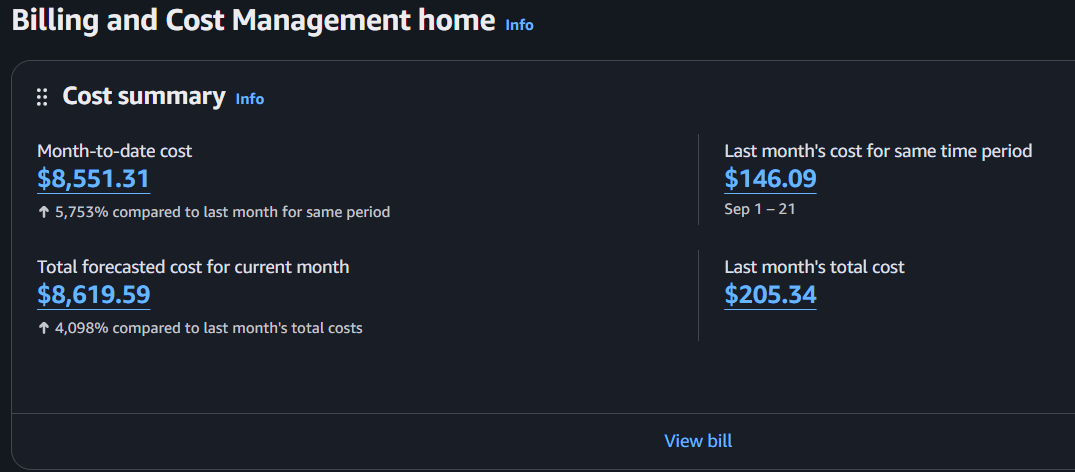
We recently investigated a client’s AWS account after they received a security alert about suspicious activity involving a potentially compromised root access key. AWS had restricted some services due to suspicious activity, and the client discovered that their monthly AWS billing forecast had jumped by around $8,000.
While reviewing AWS CloudTrail, we found thousands of Amazon Bedrock API requests made using the compromised root access key. But something else caught our attention: the same key had also been used in S3 requests with a user-agent identifying itself as UpdraftPlus, a popular WordPress backup plugin.
Following that lead, we found that multiple WordPress websites hosted on the client’s AWS EC2 server were using the same root access key for S3 backups through UpdraftPlus. The key itself had been created nearly six years earlier, and the websites had separate backup buckets.
This meant a credential used for routine WordPress backups had access to practically the entire AWS account, including services like Amazon Bedrock.
We couldn’t establish exactly how the attacker obtained the key. But the investigation uncovered a serious security misconfiguration, an outdated UpdraftPlus installation, and a potential credential exposure point worth examining.
The AWS security alert and unexpected billing forecast
AWS had detected suspicious activity involving a potentially compromised root access key and temporarily restricted certain services. The notification instructed the account owner to disable the affected key and investigate any unauthorized activity.
At the same time, the client’s monthly AWS billing forecast had increased by approximately $8,000, with the unexpected usage coming from Amazon Bedrock, a service they weren’t using for their normal workloads.
Despite the service restrictions, the root access key remained active until the we manually disabled it.
To understand what had happened, we needed to determine when the suspicious activity began, what the key had been used for, and whether other AWS services were affected. We started by examining the account’s AWS CloudTrail Event History.
CloudTrail revealed thousands of Bedrock requests
The AWS account didn’t have a CloudTrail trail configured, but Event History was still available. AWS retains 90 days of management events by default, which allowed us to review the recent API activity.
Filtering the logs by the compromised root access key revealed tens of thousands of Amazon Bedrock events, with most of the activity concentrated on October 19, 2026.
One external IP address accounted for the majority of suspicious requests:
| CloudTrail finding | Result |
|---|---|
| Bedrock API requests from the main source IP | 23,719 |
| Requests without recorded API errors | 22,225 |
| Streaming completion events | 20,274 |
| Main successful-request window | Approximately 66 minutes |
| Affected service | Amazon Bedrock |
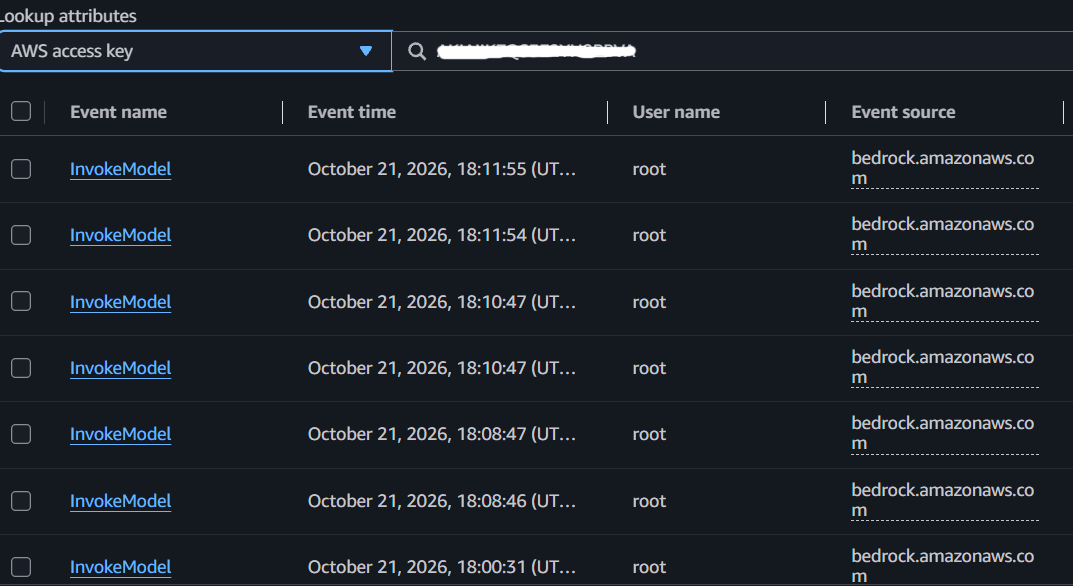
The attacker had been using the key to invoke Claude models through Amazon Bedrock, with thousands of streaming responses recorded during the activity.
One detail worth mentioning: AWS creates an additional CloudTrail event when a streaming response finishes. These aren’t separate API requests, so we excluded them from the invocation count.
More than 22,000 requests had no recorded API error, indicating substantial successful model activity. The CSV didn’t contain enough billing details to calculate the cost of each request, but the monthly billing forecast had increased by around $8,000.
AWS explains how these events are recorded in its Amazon Bedrock CloudTrail documentation.
The key had been tested almost two months earlier
Looking further back through CloudTrail, we found an interesting event from August 23, 2026.
The same root access key had been used in a GetCallerIdentity request with a user-agent identifying itself as TruffleHog, a tool commonly used to find and validate exposed credentials.
Another request identifying itself as TruffleHog appeared on October 13, followed by the main Bedrock attack on October 19.
This suggested the key might have been exposed well before the expensive Bedrock activity began.
There was also a suspected earlier WordPress compromise, so we tried correlating the AWS events with the websites’ access logs. Unfortunately, the server logs only went back to September. Without the August logs, we couldn’t establish whether the earlier WordPress incident was connected to the credential exposure.
Tracing the root key back to UpdraftPlus
While reviewing the root key’s activity, we noticed repeated S3 requests with UpdraftPlus in the user-agent field.
The CloudTrail export contained 954 such requests, all using the same AWS root access key.
We checked the WordPress installations hosted on the client’s EC2 server and confirmed that several websites were using that same root key in UpdraftPlus for S3 backups.
Each website had its own backup bucket, but the credentials were shared across multiple installations.
The AWS console showed that the key had been created nearly six years earlier. We couldn’t verify how long each website had used it, but the credential had clearly been around for a long time.
An outdated UpdraftPlus installation
Another detail in the CloudTrail records caught our attention. The UpdraftPlus user-agent strings reported different plugin versions, including 1.24.3, which continued appearing in requests through October 19.
Most of the client’s websites had been updated, but we eventually identified an older WordPress multisite installation still running UpdraftPlus 1.24.3.
That version was affected by several known security issues, including CVE-2026-82841, a remote-storage credential disclosure vulnerability disclosed in September 2026.
The vulnerability affects UpdraftPlus versions before 1.26.8 under specific post-migration conditions. In affected installations, even a logged-in Subscriber could potentially retrieve stored backup destination credentials.
The multisite installation was running a vulnerable version, but we couldn’t confirm that the required post-migration conditions existed or find evidence that this vulnerability had been exploited.
So while it was worth investigating, we couldn’t attribute the AWS credential leak to this particular vulnerability.
The AWS secret key was accessible in UpdraftPlus settings
We also noticed something interesting while checking the UpdraftPlus S3 configuration.
The AWS access key was visible in the settings page, while the secret key was hidden behind a password field. However, using Firefox’s Reveal Password option, we could display the stored secret directly.
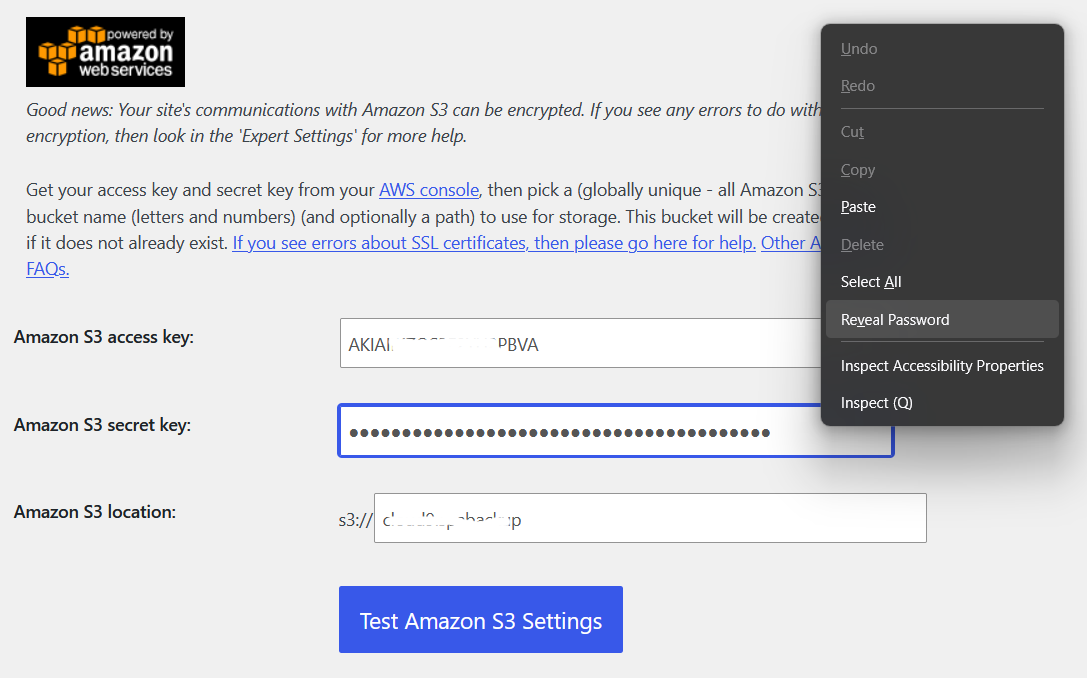
Of course, someone would need sufficient access to the UpdraftPlus administration page first. This doesn’t mean the credentials were publicly accessible or could be retrieved without authentication.
We also checked the WordPress database and confirmed that the AWS secret key was stored without encryption. The actual secret was also available to the browser when the settings page loaded, rather than just a masked or encrypted value.
If an attacker had already gained the necessary WordPress access, retrieving those AWS credentials could have been straightforward. However, we couldn’t confirm whether this was how the key was stolen.
This concern was previously raised on WordPress.org
We found an older UpdraftPlus support forum discussion where another user raised essentially the same concern: S3 credentials could be retrieved from the HTML source of the plugin’s settings page.
UpdraftPlus developer David Anderson responded that hiding the credentials from an administrator wouldn’t provide meaningful protection, since someone with that level of access could also retrieve them from the WordPress database or backups.
He also recommended using restricted IAM permissions and avoiding credential reuse across websites.
There is a fair technical argument there. Hiding a password field doesn’t necessarily protect a secret once someone has full access to WordPress.
Still, having the secret available in the settings page gives anyone with sufficient access another way to retrieve it. Whether the plugin should handle this differently is a separate discussion.
In this case, the much bigger problem was the type of AWS credential being stored.
The real security mistake: using an AWS root access key
UpdraftPlus only needed permission to upload backups to Amazon S3, retrieve them for restoration, and perform the required backup management operations.
Instead, it had been configured with an AWS root access key.
Unlike a restricted IAM credential, a root access key provides extensive permissions across the AWS account. It isn’t limited to a particular S3 bucket or service.
That’s how a credential intended for WordPress backups could also be used to invoke Claude models through Amazon Bedrock.
If the websites had been using properly restricted S3 credentials, the attacker wouldn’t have been able to use those credentials for Bedrock, even if they managed to steal them.
They could still potentially access or delete backups within the permitted S3 resources, but not run unrelated AWS services using that identity.
AWS explicitly recommends against creating root access keys. UpdraftPlus also provides instructions for configuring restricted IAM permissions for S3 backups.
Reusing the same root key across multiple websites made the risk even greater. If the key was exposed through any one of those installations, the attacker would have access to the same AWS credential used by all of them.
What we confirmed and what remains unknown
The investigation confirmed that the compromised root access key had been used for unauthorized Bedrock requests and was also configured in UpdraftPlus across multiple WordPress websites.
We also identified an outdated multisite installation and confirmed that the stored AWS secret could be retrieved from the UpdraftPlus settings page by someone with sufficient administrative access.
What we couldn’t determine was exactly how the attacker obtained the key.
It could have been through compromised WordPress administrator access, a vulnerable plugin, access to the database or backups, or another exposure unrelated to WordPress.
The same credential had been shared across multiple websites for years, and several administrators and third-party contractors had access to those installations. Without the older server logs, we couldn’t reliably identify the source or timing of the leak.
How we secured the AWS backup credentials
The compromised root access key was disabled and subsequently deleted. We replaced it with a dedicated IAM user restricted to the existing S3 backup buckets and the EC2 server’s public outbound IP.
This allowed the websites to continue using their existing backup buckets without granting the new credential access to Bedrock or other unrelated AWS services.
The main remediation steps were:
- Remove the compromised root key. Retire the exposed credential and review other AWS access keys and IAM permissions.
- Restrict S3 access. Create an IAM identity with only the S3 permissions needed for the existing backup buckets, restricted to the server’s outbound IP.
- Update the WordPress backup configurations. Replace the root credentials in UpdraftPlus and verify that backups continue working.
- Review the WordPress installations. Check outdated plugins, administrator accounts, modified files and available access logs for possible compromise.
- Preserve the AWS evidence. Keep the CloudTrail records and billing information for the investigation and billing dispute with AWS.
Using one restricted IAM credential across multiple websites still carries some risk. If an attacker compromises a website and can make requests from the permitted server, they could potentially access the other backup buckets covered by that credential.
Separate IAM identities would provide better isolation, but even the shared restricted setup is a significant improvement over using an AWS root key.
A WordPress backup shouldn’t have access to an entire AWS account
We couldn’t prove exactly how the AWS root key was stolen. But we did establish that it was being used for routine WordPress backups across multiple websites, with permissions far beyond what those backups required.
That single misconfiguration turned an exposed backup credential into an AWS account security incident with around $8,000 in unexpected billing forecast charges.
Even if WordPress is compromised and an attacker manages to steal backup credentials, those credentials should not give them access to unrelated AWS services.
Keeping plugins updated and protecting WordPress administrator access are important. But limiting what external credentials can do is just as important, particularly when WordPress is connected to cloud services.