The WordPress pharma hack is an SEO spam infection where attackers use your website to promote pharmaceutical, fake product, or drug-related spam in Google Search.
The website may look normal when you visit it directly. But in Google Search, your pages may show spam titles, strange meta descriptions, hidden product keywords, or links to suspicious pharmacy websites. In some cases, visitors who click from search results may be redirected to a different domain.
This type of hack is often caused by vulnerable plugins, outdated themes, weak admin access, nulled software, or hidden backdoors left from an earlier infection. Attackers may inject spam into files, database tables, theme templates, plugins, or rewrite rules.
This guide explains how to identify a WordPress pharma hack, where it usually hides, how to clean it safely, and how to reduce the chance of reinfection.
What Is the WordPress Pharma Hack?
The WordPress pharma hack is a type of SEO poisoning. Instead of visibly changing your homepage, attackers manipulate how your website appears in search engines.
Common symptoms include:
- Drug-related titles showing in Google Search
- Spam descriptions added to normal pages
- Fake product or pharmacy pages indexed under your domain
- Hidden links added to posts, pages, widgets, or theme files
- Search visitors redirected to suspicious external websites
- Google Search Console showing unusual indexing spikes
- Unknown sitemaps submitted in Search Console
- Spam content visible to search engines but not to direct visitors
Pharma spam is related to other SEO spam attacks such as Japanese keyword hacks, Chinese keyword spam, casino spam, and fake product page injections. The difference is the search intent: pharma hacks usually target drug, supplement, or fake pharmacy keywords.
Identify a Pharma Hack Using Google Search
The easiest first check is Google Search.
Search your domain with the site: operator:
site:yourdomain.comThen search for suspicious pharma-related terms connected to your domain:
site:yourdomain.com pharmacy
site:yourdomain.com pills
site:yourdomain.com prescription
site:yourdomain.com drug
site:yourdomain.com viagra
site:yourdomain.com cialis
Look for results that do not belong to your website:
- Spam titles
- Pharmaceutical keywords
- Fake product descriptions
- Strange URL paths
- Pages you never created
- Search snippets that do not match the real page content
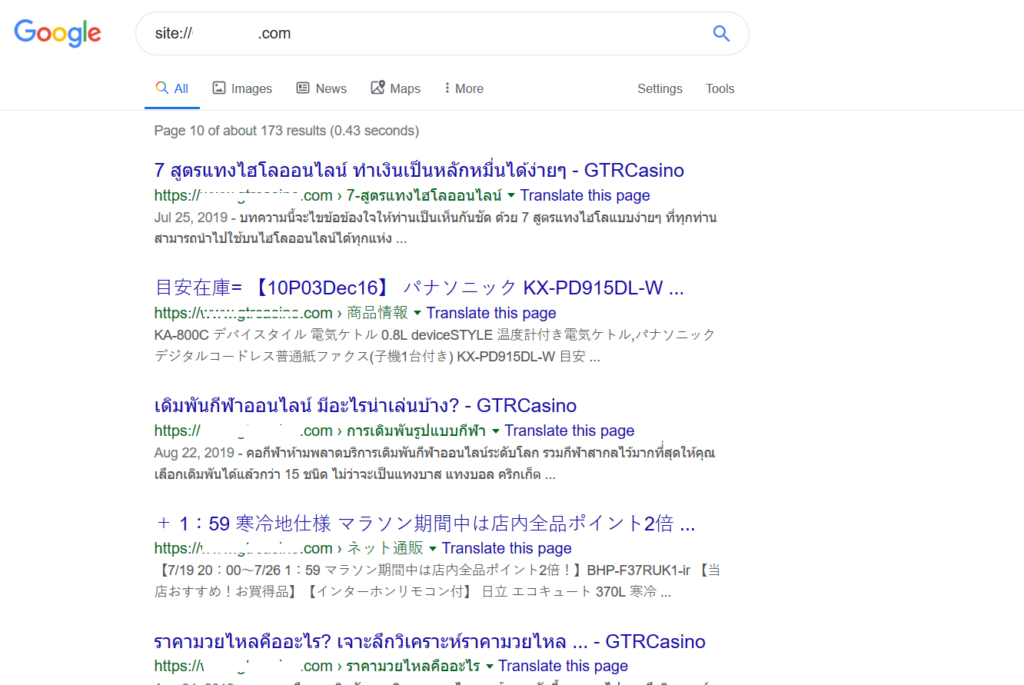
If your search results show Japanese text instead of pharma terms, you may be dealing with a related but different SEO spam variant. In that case, read your Japanese keyword hack cleanup guide as well.
Check Google Search Console
Google Search Console is one of the most important places to investigate pharma spam.
Check these areas:
- Security Issues: Look for hacked content, malware, or deceptive page warnings.
- Manual Actions: Check whether Google applied a penalty.
- Pages: Look for unexpected indexed URLs or sudden indexing spikes.
- Sitemaps: Remove unknown or spam sitemaps.
- Users and permissions: Remove unauthorized owners or users.
- URL Inspection: Compare what Google sees with what visitors see.
Attackers sometimes submit spam sitemaps or add themselves as Search Console users. If you find an unknown user or verification method, remove it and check how it was added.
Why the Pharma Hack Is Hard to Detect
Many pharma hacks use cloaking. That means the website shows different content depending on who visits.
For example:
- Normal visitors may see your real website.
- Logged-in administrators may see nothing suspicious.
- Googlebot may see pharma spam.
- Search visitors may be redirected to a spam website.
- Mobile visitors may see a different result than desktop visitors.
This is why checking only your homepage while logged in is not enough.
Test the site:
- Logged out
- From an incognito/private browser window
- From mobile
- From Google Search results
- Using Google Search Console URL Inspection
- With an external scanner such as the Securewp Remote Security Scanner
Where Pharma Hack Malware Usually Hides
Pharma spam can be injected into files, database content, rewrite rules, or hidden backdoors. The exact location depends on how the site was compromised.
1. Website File Modification
Attackers may modify WordPress core, theme, or plugin files to load spam content or redirects.
Common suspicious locations include:
wp-content/uploads/*.php
wp-content/wp-update.php
wp-content/themes/index.php
wp-content/themes/your-theme/functions.php
wp-content/themes/your-theme/header.php
wp-content/themes/your-theme/footer.php
wp-includes/images/wp-img.php
wp-includes/*.php
index.php
.htaccess
Look for unexpected code, recently modified files, unknown PHP files in uploads, suspicious external domains, encoded strings, and unfamiliar include statements.
2. Rewrite Rule Injection
Some infections modify .htaccess or server rewrite rules to create fake spam URLs or redirect search visitors.
Look for suspicious rules involving:
RewriteRule
RewriteCond
HTTP_REFERER
HTTP_USER_AGENT
Redirect 301
RedirectMatch
external domains
random .php handlers
fake .html URLs
Not every rewrite rule is malicious. WordPress, caching plugins, and security plugins may add legitimate rules. But unknown rules pointing to strange PHP files or external domains should be investigated.
3. Malicious Scripts in the Database
Pharma spam often hides in the WordPress database.
Commonly affected tables include:
wp_options
wp_posts
wp_postmeta
wp_usermeta
widget settings
page builder content
custom HTML blocks
navigation menus
Suspicious option names may vary, but you should review unexpected options, unknown widgets, injected scripts, hidden links, and recently changed content.
Examples of suspicious database indicators include:
unknown options with encoded content
unexpected RSS/transient-like option names
hidden links in post content
spam snippets in meta descriptions
unknown widget content
malicious scripts in page builder fields
4. Backdoor Admin Users
Some pharma hack infections create unauthorized administrator accounts so attackers can regain access later.
Check Users → All Users and review every administrator account.
Look for:
- Unknown admin users
- Recently created accounts
- Suspicious email addresses
- Numeric usernames
- Users with unexpected administrator privileges

5. Cloaking and Search-Only Redirects
Some infections try to hide from administrators, security tools, or search engine reviewers by changing behavior based on IP address, user agent, referrer, cookies, or device type.
Instead of looking for one exact code sample, look for suspicious behavior such as:
different content for Googlebot
different content for logged-out users
redirects only from Google Search
redirects only on mobile
unknown remote requests
external spam domains
bot/user-agent filtering logic
hidden spam links
If the site looks clean to you but users from search results are redirected, treat it as a cloaked infection.
How to Clean a WordPress Pharma Hack
Cleaning a pharma hack means removing the visible spam and the hidden source that created it.
1. Take a full backup first
Before removing files or editing the database, take a full backup of the current infected site. Store it safely for investigation. Do not restore it later unless you are sure it is clean.
2. Scan from outside and inside
Use an external scanner to check public-facing symptoms such as spam snippets, redirects, blacklist status, and visible malware indicators.
Then scan inside WordPress for infected files, backdoors, modified core files, vulnerable plugins, suspicious database content, and unknown admin users.
3. Remove malicious files and backdoors
Search for unknown PHP files in uploads, fake plugin folders, modified theme files, suspicious files in wp-includes, and recently modified files that do not belong to WordPress.
Replace WordPress core files with a clean copy from WordPress.org instead of manually editing core files line by line.
4. Clean infected theme and plugin files
Check active and inactive themes. Pharma malware often hides in functions.php, header.php, footer.php, and template files.
If a plugin or theme is infected, replace it with a clean copy from the official source. Remove nulled, abandoned, or unused software completely.
5. Clean the database
Review posts, pages, options, widgets, menus, page builder content, and custom HTML blocks for spam links, injected scripts, and suspicious meta content.
Be careful with serialized data in WordPress options. If you are not comfortable editing it manually, use a safe database tool or get professional help.
6. Remove unauthorized admin users
Delete unknown admin users and review all user roles. Reset passwords for legitimate administrators.
7. Reset credentials
Reset passwords for:
- WordPress administrators
- Hosting control panel
- SFTP/FTP accounts
- Database users
- Cloudflare or DNS accounts
- Email accounts used for password resets
8. Patch the entry point
Update WordPress core, plugins, and themes. Remove abandoned plugins, unused themes, and nulled software.
If you do not fix the entry point, the pharma spam can return.
9. Check Google Search Console
Remove spam sitemaps, unauthorized users, and suspicious verification methods.
Inspect important URLs and request recrawling after cleanup.
10. Return 404 or 410 for fake spam URLs
If attackers created fake URLs under your domain, make sure those URLs no longer return spam content.
Use:
- 404 Not Found for pages that do not exist
- 410 Gone for pages that were spam and are intentionally removed
Do not redirect all spam URLs to the homepage. That can create confusing signals and may not clean the index properly.
Removing Pharma Spam from Google Search
After the website is clean, you need to help Google recrawl the correct version.
Take these steps:
- Confirm the spam content is removed.
- Confirm fake spam URLs return 404 or 410.
- Remove spam sitemaps from Google Search Console.
- Submit a clean sitemap.
- Use URL Inspection for important cleaned pages.
- Use the Removals tool only for urgent temporary hiding.
- Request review if Search Console shows a security issue or manual action.
Search recovery may take time, especially if thousands of spam URLs were indexed. The most important thing is that Google no longer sees spam when it recrawls your site.
Why the Pharma Hack Comes Back After Cleanup
If the spam returns, the cleanup missed something.
Common reasons include:
- A backdoor file still exists
- An unknown admin user remains
- Theme files were cleaned but not replaced
- A vulnerable plugin was not patched
- Nulled software is still installed
- Database spam was only partially removed
- Spam rewrite rules remain active
- Hosting, FTP, or database credentials are still compromised
- Another site on the same hosting account is infected
Repeat infections usually mean the root cause was not removed.
How to Prevent WordPress Pharma Hack Reinfection
- Keep WordPress core, plugins, and themes updated.
- Remove unused plugins and themes.
- Never use nulled plugins or themes.
- Use strong, unique passwords.
- Enable 2FA for administrator accounts.
- Disable file editing in the WordPress dashboard.
- Block PHP execution in uploads where possible.
- Protect sensitive files such as backups, logs, and
wp-config.php. - Use a firewall and bot protection.
- Monitor vulnerability alerts.
- Review audit logs for suspicious changes.
- Run periodic malware scans.
- Check Google Search Console regularly.
If you want ongoing inside-WordPress protection, SiteFort can help with malware scanning, vulnerability alerts, hardening, firewall rules, login protection, 2FA, audit logs, and bot blocking.
When to Get Professional Help
Consider professional cleanup if:
- Spam returns after cleanup
- Google has indexed many fake pharma pages
- Search visitors are redirected but direct visitors see a clean site
- You cannot find where the spam is generated
- Unknown admin users keep appearing
- Your host suspended the website
- The site is important for sales, leads, or client trust
If you need help, our WordPress malware removal service can clean the infection, remove backdoors, and help reduce reinfection risk.
Watch for the Spam Coming Back
The WordPress pharma hack is a search-facing SEO spam infection. Your website may look normal, but Google may show drug-related spam, fake product snippets, hidden landing pages, or suspicious redirects.
Do not only remove the visible spam. Check files, database content, admin users, rewrite rules, Search Console, vulnerable plugins, and hidden backdoors. After cleanup, make sure fake spam URLs return 404 or 410 and submit a clean sitemap to Google.
Most importantly, keep monitoring after cleanup. If the pharma spam returns, the root cause is still active.